Feature Overview
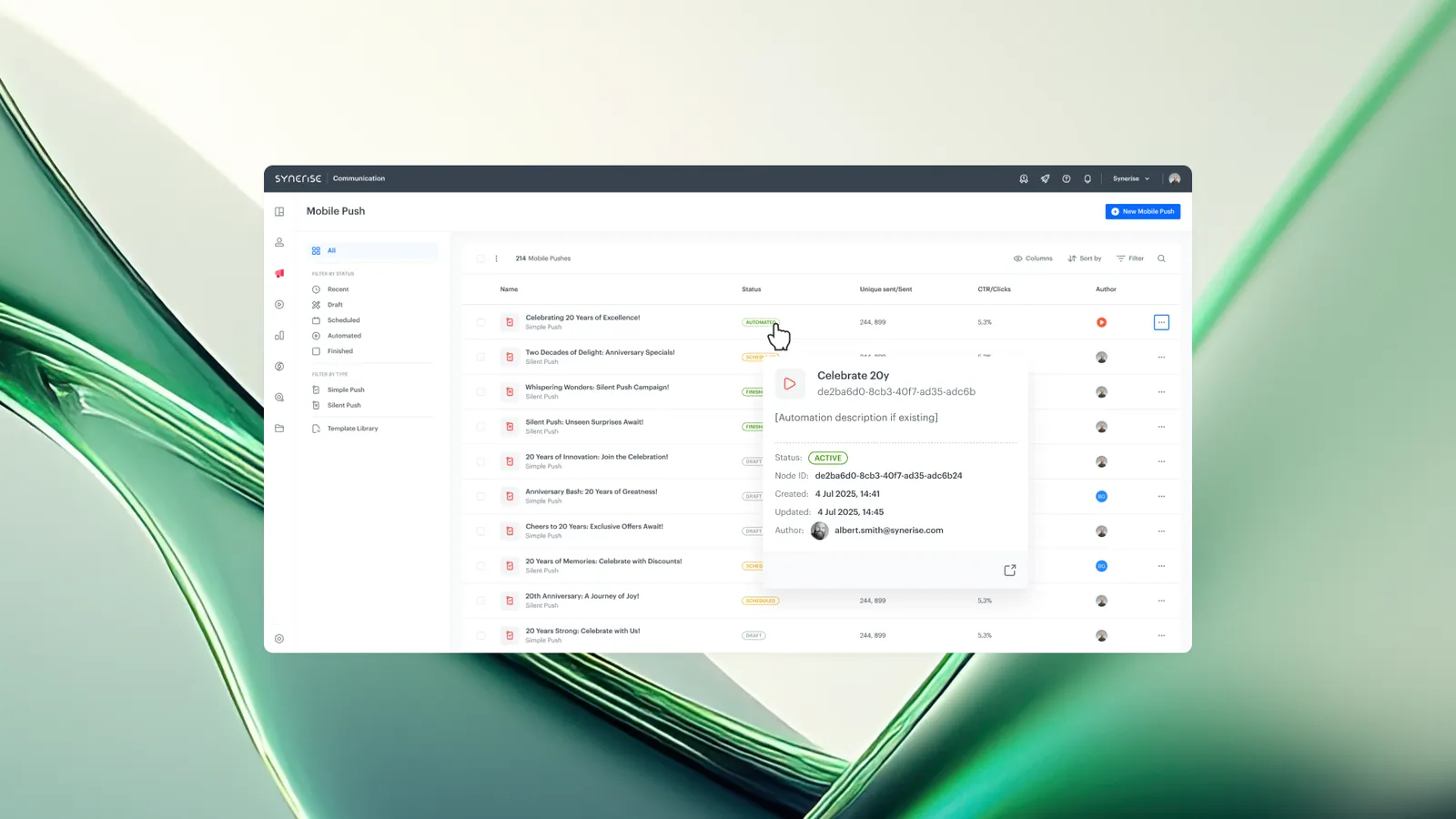
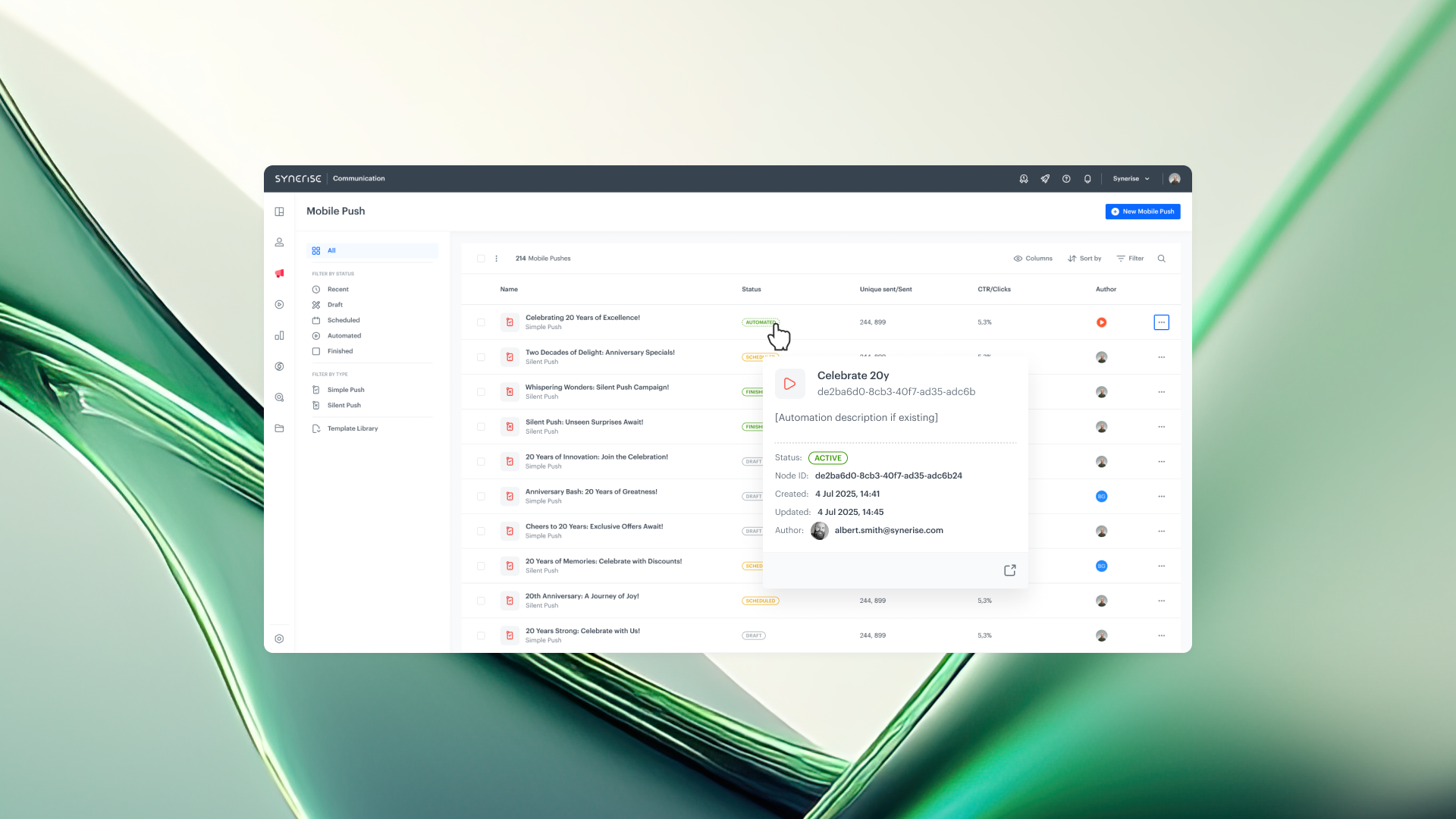
Workflow Status is an enhancement to the Synerise Communication list that displays contextual information about the Automation workflow behind each campaign. A quick-view pop-up shows the workflow's current status, creation and modification dates, author information, and a direct link to open the workflow in the Automation editor.
This feature eliminates the need to switch between the Communication list and the Automation module to find information about the workflow driving a campaign.
What Is Workflow Status?
Workflow Status is a contextual information display available on the Synerise Communication list for campaigns created by Automation workflows. When viewing a campaign entry, users can access a quick-view pop-up that shows the associated workflow's status (e.g., active, paused), when it was created or last modified, who created or modified it, and a direct link to open the workflow in the Automation editor.
Why Workflow Status Matters
Managing automated campaigns in Synerise often requires switching between the Communication list and the Automation module to check workflow details, confirm authorship, or verify status. This context switching adds time and friction, especially when managing multiple campaigns.
Workflow Status addresses this by:
- Surfacing workflow metadata directly in the Communication list, reducing the need to navigate to the Automation module
- Providing immediate visibility into which workflows are active, paused, or modified
- Including author and timestamp information for accountability and audit purposes
- Offering a direct link to the workflow editor for quick review or modification
Key Capabilities
Quick-view pop-up with workflow details
Each campaign created by Automation displays a pop-up accessible from the Communication list. The pop-up shows the workflow's current status, creation date, last modification date, and the user who created or modified it.
Direct link to workflow in Automation
The pop-up includes a direct link that opens the associated workflow in the Synerise Automation editor. Users can review or edit the workflow setup without manually searching for it in the Automation module.
How Workflow Status Works
- Open the Communication list in Synerise.
- Locate a campaign that was created by an Automation workflow.
- Access the quick-view pop-up for the campaign entry.
- View the workflow's current status, creation/modification timestamps, and author.
- Click the direct link to open the workflow in the Automation editor if review or edits are needed.
Example Use Case
A marketing manager reviews the Communication list and sees an automated email campaign that appears to have stopped sending. Instead of navigating to the Automation module and searching for the associated workflow, they access the quick-view pop-up directly from the campaign entry. The pop-up shows the workflow status is "paused" and was last modified by a colleague two days ago. The manager clicks the direct link to open the workflow in the Automation editor, reviews the configuration, and reactivates the workflow.
FAQ
What information does the Workflow Status pop-up show?
The pop-up displays the workflow's current status, creation date, last modification date, the user who created or modified it, and a direct link to open the workflow in the Automation editor.
Does Workflow Status work for all campaigns?
Workflow Status is displayed for campaigns created by Automation workflows. Manually created campaigns without an associated workflow do not show this information.
Can I edit the workflow from the Communication list?
The Communication list provides a direct link to open the workflow in the Automation editor. Editing is done within the Automation module after following the link.
Key Facts
| Attribute | Value |
|---|---|
| Feature | Workflow Status |
| Product | Synerise |
| Module | Communication list / Automation |
| Purpose | Display workflow metadata and direct link in the Communication list for campaigns created by Automation |
| Information displayed | Workflow status, creation date, modification date, author, direct link to editor |
| Configuration required | None (automatic for Automation-created campaigns) |
Related Concepts
- Synerise Automation workflows
- Communication list in Synerise
- Campaign management
- Workflow monitoring
TL;DR
Workflow Status adds a quick-view pop-up to the Synerise Communication list for campaigns created by Automation. The pop-up displays the associated workflow's current status, creation and modification timestamps, author, and a direct link to open the workflow in the Automation editor. This eliminates context switching between the Communication list and the Automation module when managing automated campaigns.