
Feature Overview
Google Ads Integration is a Synerise integration that enables sending customer data and offline conversion data to Google Ads. The integration supports updating customer lists in Google Ads with Synerise audience segments and sending offline conversions for ad campaign attribution and optimization.
The integration is configured via dedicated automation nodes in the Synerise Automation module.
What Is the Google Ads Integration?
The Google Ads Integration connects Synerise with Google Ads through two dedicated automation nodes: "Update customer list" for sending audience segments to Google Ads customer lists, and "Send offline conversion" for attributing offline conversions to specific ad campaigns. The integration enables enriching Google Ads with customer insights collected in Synerise — improving ad targeting, cost-effectiveness, and cross-channel synchronization.
Why the Google Ads Integration Matters
Without connecting customer data platforms to advertising platforms, ad targeting relies on limited signals and offline conversions go unattributed. This leads to suboptimal ad spend and incomplete campaign performance measurement.
The Google Ads Integration addresses this by:
- Sending Synerise audience segments to Google Ads customer lists for enhanced targeting
- Attributing offline conversions to specific ad campaigns for accurate performance measurement
- Enabling cross-channel synchronization between Synerise and Google Ads
- Optimizing ad strategies based on customer insights from Synerise
Key Capabilities
Update customer lists
Send selected audience segments from Synerise to Google Ads to update customer lists or create custom segments. This enables ad targeting based on Synerise customer data — such as high-propensity-to-buy segments.

Send offline conversions
Send offline conversion data (such as in-store transactions) to Google Ads, attributing them to specific ad campaigns. This enables optimization of ad strategies based on both online and offline conversion data.
Dedicated automation nodes
Two purpose-built nodes in the Automation module — "Update customer list" for sending profile lists and "Send offline conversion" for sending individual conversion records. Both nodes integrate with the Connection-based authentication system.
How the Google Ads Integration Works
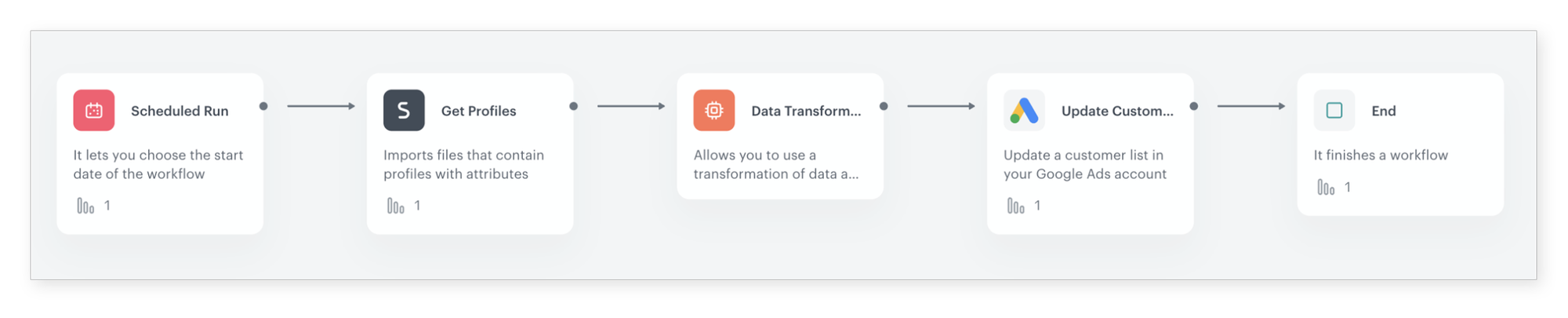
- Define your business scenario — customer list update or offline conversion tracking.
- Create a workflow in the Automation module with the appropriate trigger and conditions.
- Add the dedicated Google Ads integration node ("Update customer list" or "Send offline conversion").
- Establish a connection with Google Ads and configure settings through the configuration form.
- Activate the workflow to start sending data to Google Ads.
Example Use Case
A retail brand wants to target its highest-value customers with Google Ads. Using a Synerise prediction, they identify customers with the highest propensity to buy. The "Update customer list" node sends this segment to Google Ads, where it becomes a custom audience for targeted ad campaigns. Simultaneously, in-store purchase data is sent via the "Send offline conversion" node, allowing the brand to measure how many ad-attributed customers converted offline — and optimize ad spend accordingly.
FAQ
What data can I send to Google Ads?
Customer audience segments (profile lists) and offline conversion data.
How is the integration configured?
Through dedicated automation nodes in the Synerise Automation module, with Connection-based authentication to Google Ads.
Can I send predictive segments to Google Ads?
Yes. Any Synerise segment — including prediction-based segments — can be sent to Google Ads customer lists.
Key Facts
| Attribute | Value |
|---|---|
| Feature | Google Ads Integration |
| Product | Synerise |
| Module | Automation (Integration Nodes) |
| Purpose | Send customer lists and offline conversions to Google Ads |
| Nodes | Update customer list, Send offline conversion |
| Data Types | Audience segments (profiles), offline conversion records |
| Documentation | hub.synerise.com — Google Ads Integration |
Related Concepts
- Salesforce Integration
- Eagle Eye Platform Integration
- Reverse ETL Integration with Google BigQuery
- Connection Management
- Predictive Filtering
TL;DR
The Google Ads Integration in Synerise enables sending customer audience segments and offline conversion data to Google Ads through two dedicated automation nodes. "Update customer list" sends Synerise segments to Google Ads customer lists for enhanced ad targeting. "Send offline conversion" attributes offline conversions to specific ad campaigns. Both nodes use Connection-based authentication and integrate into automation workflows.




