
Feature Overview
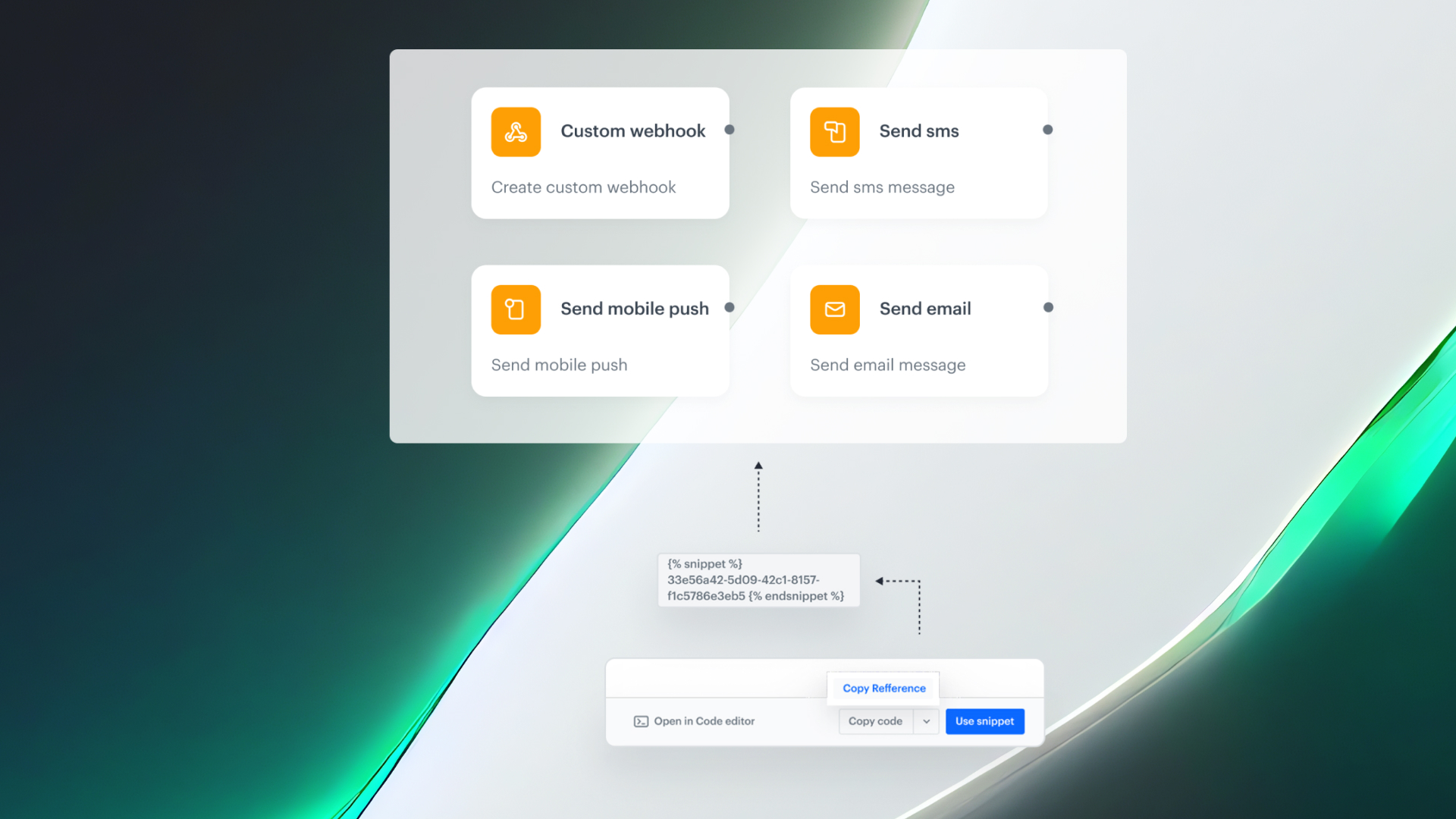
Snippets Widget in Automation is a capability in Synerise that enables inserting predefined, reusable content snippets directly into Automation workflow nodes — including Email, SMS, Push, Web Push, and Webhook actions. The widget provides a browsable snippet library within the workflow builder, with automatic detection of all fields that support dynamic content. Snippets referenced in workflows update automatically when edited — no republishing required.
The feature is available in the Synerise Automation workflow builder across all action nodes that support dynamic content.
What Is the Snippets Widget in Automation?
The Snippets Widget is an interface within Synerise Automation that lets users browse, search, create, and insert snippets directly into workflow action nodes. Snippets are reusable content blocks — text, voucher codes, recommendation layouts, or any Jinjava-based dynamic content — that can be maintained in one place and referenced across multiple workflows. The widget automatically identifies and marks all fields that accept dynamic values, showing a snippet icon wherever insertion is possible.
Why the Snippets Widget in Automation Matters
Without reusable snippets, teams recreate message content from scratch in each workflow, leading to inconsistencies, manual syncing overhead, and difficulty knowing which fields support dynamic content. Updating shared content across multiple workflows requires editing each one individually.
The Snippets Widget addresses this by:
- Enabling one-click insertion of reusable content blocks into any automation action node
- Automatically marking all fields that accept dynamic values with a snippet icon
- Propagating snippet edits to every workflow that references the snippet — no republishing required
- Providing a built-in snippet library for searching, browsing, and managing snippets without leaving the workflow builder
Key Capabilities
Snippet insertion in workflow action nodes
Any action node in the workflow builder (Email, SMS, Web Push, Webhook, etc.) that supports dynamic content now displays a snippet icon on compatible fields. Clicking the icon opens the snippet library for browsing, searching, or creating snippets.
Automatic field detection
The widget automatically recognizes and tracks every field across all nodes in the workflow diagram that supports dynamic values. This eliminates guesswork about where Jinjava-based references can be used.
Live propagation of snippet updates
When a snippet is inserted as a reference, any future edit to that snippet propagates automatically to every live automation that uses it — no redeploys or republishing required.
How the Snippets Widget in Automation Works
- Select any action block in the Automation workflow builder (Email, SMS, Web Push, Webhook, etc.).
- Fields that accept dynamic values display the snippet icon.
- Click the icon to open the Snippet widget — search, browse, or create snippets.
- Preview snippet content and metadata.
- Insert the snippet into the field.
- Publish the workflow. Future edits to the snippet propagate automatically to all workflows referencing it.
Example Use Case
A retail company uses the same loyalty points balance message across 15 different automation workflows (welcome series, post-purchase, re-engagement, etc.). Instead of maintaining 15 separate copies, they create a single "Loyalty Balance" snippet. Using the Snippets Widget, they insert the snippet into each workflow. When the loyalty message format changes, they edit the snippet once — and the update is reflected across all 15 workflows automatically.
FAQ
What is the Snippets Widget in Automation?
An interface in the Automation workflow builder for inserting, browsing, and managing reusable content snippets across action nodes.
Which action nodes support snippets?
All action nodes that support dynamic content: Email, SMS, Push, Web Push, Webhook, and others.
Do snippet updates propagate automatically?
Yes. When a snippet is referenced, edits propagate to all workflows using it without republishing.
How do I know which fields support snippets?
The widget automatically marks compatible fields with a snippet icon.
Key Facts
| Attribute | Value |
|---|---|
| Feature | Snippets Widget in Automation |
| Product | Synerise |
| Module | Automation |
| Purpose | Insert, browse, and manage reusable content snippets in workflow action nodes |
| Supported nodes | Email, SMS, Push, Web Push, Webhook, and all dynamic-content-capable nodes |
| Auto-propagation | Yes — snippet edits propagate to all referencing workflows |
| Field detection | Automatic — snippet icon marks all compatible fields |
Related Concepts
- Snippet Playground in Synerise
- Snippets in Documents and Screen Views
- Snippet metadata and direct object access
- Synerise Automation workflows
- Reusable content management
TL;DR
The Snippets Widget brings reusable content snippets into Synerise Automation. Users insert snippets into any action node (Email, SMS, Push, Webhook, etc.) via a built-in library, with automatic field detection marking where dynamic content is supported. Snippet edits propagate automatically to all referencing workflows without republishing.




