
Feature Overview
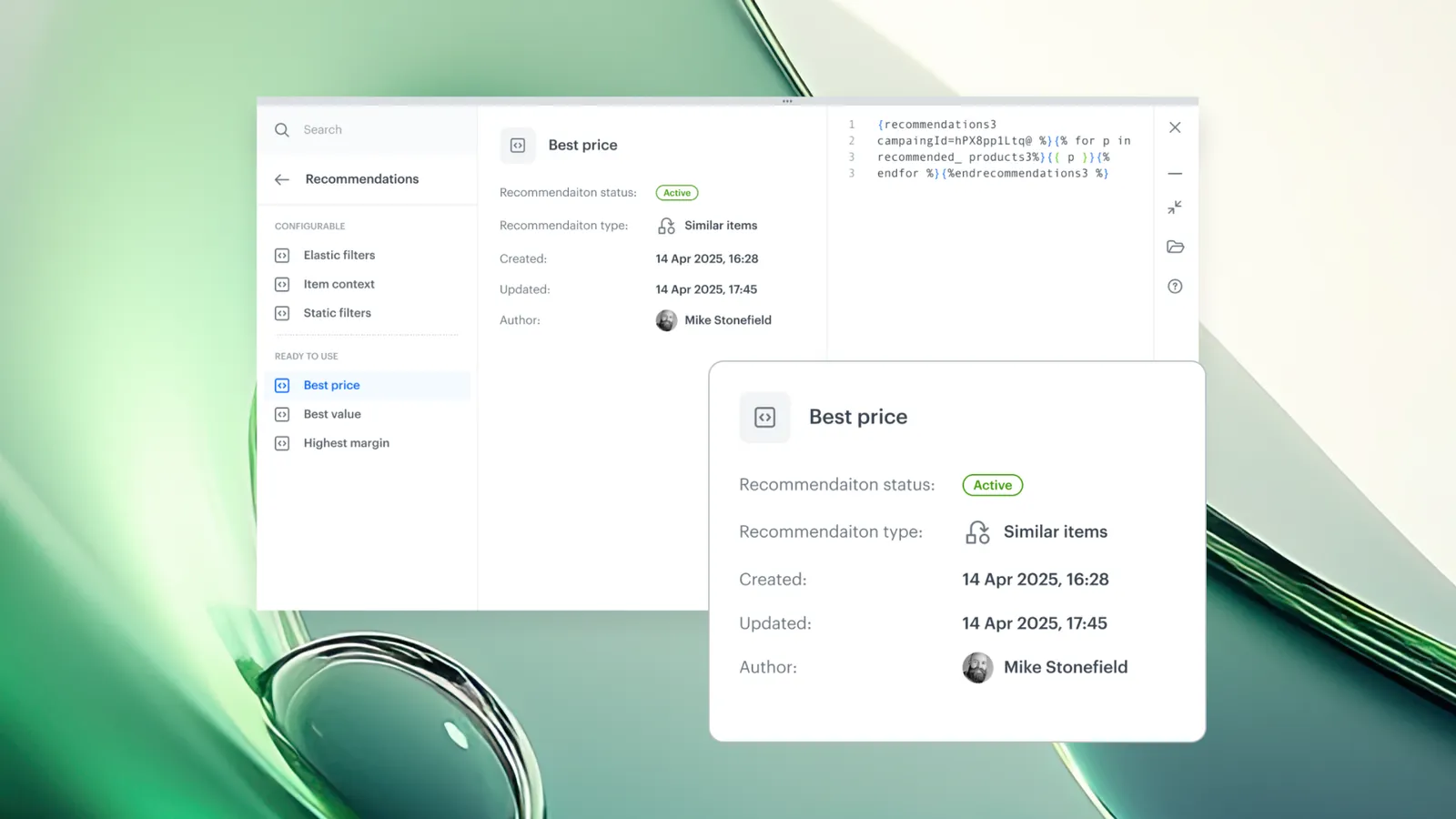
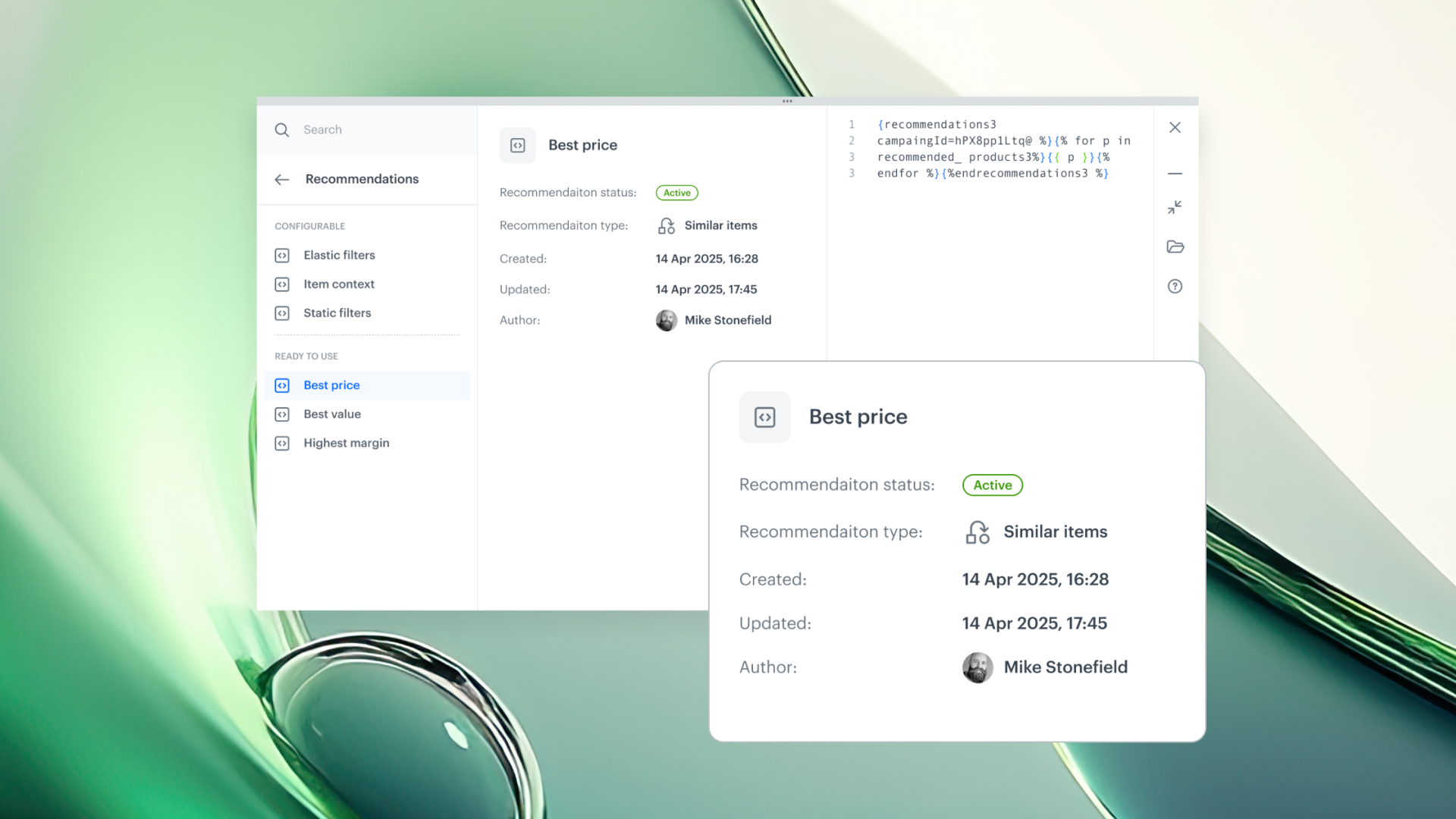
Snippet Metadata with Direct Object Access is an enhancement to the Synerise snippet system that adds a built-in metadata panel to every predefined snippet, along with direct navigation to related objects. Users can view creation and update dates, recommendation type and status, voucher pool size and assignment counts, and jump directly to the related object or documentation — all from within the snippet panel without leaving their workspace.
The feature is available wherever predefined snippets are displayed in the Synerise platform.
What Is Snippet Metadata with Direct Object Access?
Snippet Metadata with Direct Object Access is an upgrade to predefined snippets in Synerise that automatically displays contextual metadata alongside each snippet. Depending on the object type, metadata includes creation/update dates, recommendation type and status, voucher pool size and assignment counts, and other relevant details. Users can also open the related object directly from the snippet panel or jump into documentation — eliminating the need to navigate between modules for context.
Why Snippet Metadata with Direct Object Access Matters
When working with predefined snippets (recommendations, voucher pools, etc.), users frequently need to check details like "what type is this recommendation?" or "how many vouchers are left in the pool?". Without inline metadata, answering these questions requires switching between modules, opening separate views, or consulting documentation — breaking workflow focus.
Snippet Metadata with Direct Object Access addresses this by:
- Displaying contextual metadata automatically for every predefined snippet
- Providing direct navigation to the related object from within the snippet panel
- Including links to relevant documentation without leaving the workspace
- Keeping users in context during content creation and testing
Key Capabilities
Contextual metadata for predefined snippets
Every predefined snippet now shows relevant metadata automatically. Depending on the object type, this includes: creation and update dates, recommendation type and status, voucher pool size and assignment count, and other context-specific details.
Direct object access
Users can open the related object (recommendation, voucher pool, etc.) directly from the snippet panel — without navigating to a different module or view.
In-context documentation links
Documentation links are accessible directly from the snippet panel, allowing users to reference implementation details without leaving their current workspace.
How Snippet Metadata with Direct Object Access Works
- Open any snippet panel in Synerise (in Automation, Communication, Documents, etc.).
- Browse or search for a predefined snippet.
- View the contextual metadata displayed alongside the snippet (dates, status, counts, etc.).
- Click the direct access link to open the related object in its native module.
- Optionally, access documentation links from the snippet panel.
Example Use Case
A marketing team is building an email campaign that includes a voucher code snippet. From the snippet panel, they can immediately see how many unassigned vouchers remain in the pool, when the pool was last updated, and the pool status — without navigating to the Assets module. If they need to adjust the pool, they click the direct access link to open it in a new tab, make the change, and return to the campaign builder.
FAQ
What metadata is shown for predefined snippets?
Depending on the object type: creation/update dates, recommendation type and status, voucher pool size and assignment count, and other relevant details.
Can I open the related object from the snippet panel?
Yes. Direct navigation links open the related object (recommendation, voucher pool, etc.) from within the snippet panel.
Where does this feature work?
Wherever predefined snippets are displayed in Synerise — including Automation, Communication, Documents, and Screen Views.
Key Facts
| Attribute | Value |
|---|---|
| Feature | Snippet Metadata with Direct Object Access |
| Product | Synerise |
| Module | Cross-module (wherever predefined snippets are displayed) |
| Purpose | Display contextual metadata and provide direct navigation to related objects from snippet panels |
| Metadata types | Creation/update dates, recommendation type/status, voucher pool size/assignment count |
| Direct access | Open related objects and documentation from the snippet panel |
| Documentation | hub.synerise.com — Snippets |
Related Concepts
- Snippet Playground in Synerise
- Snippets Widget in Automation
- Snippets in Documents and Screen Views
- Predefined content management
- Reusable content blocks
TL;DR
Snippet Metadata with Direct Object Access adds a built-in metadata panel to every predefined snippet in Synerise. Users see contextual information (creation dates, recommendation status, voucher counts) and can navigate directly to the related object or documentation — all from within the snippet panel, without leaving their workspace.




