- Year: 2025
- Author: Kamil Gaczoł
- Category: Product
- Benefits: Reduced complexity and fewer metrics to manage, Simplified and scalable reporting, Improved automation: reduce manual errors and ensure consistency across workflows
- Use Cases: Export multiple metrics with dynamic key
- YouTube share link: https://www.youtube.com/embed/2G4QXR26TEU
- Documentation link: https://hub.synerise.com/docs/automation/actions/synerise-integrations/get-metric-results/
- Security & Performance: No
- Featured?: No
- Quarter only: fe2d257f9b00112c9e9c7daf74b6b74c
- Quarter: 905911dd435556819c0263d282da14ea
- Module: 4c6698dca829ee8a0fcb167b62e6d5d0
We’re introducing a powerful new capability in the Automation module—Dynamic Keys in the Get Metrics node. With this enhancement, users can define dynamic values for key parameters in metric configurations, unlocking even greater flexibility in reporting and decision-making workflows.
This update is especially useful for teams managing multiple segments, brands, or markets, helping them scale their automations without duplicating metric definitions or processes.
How this feature works
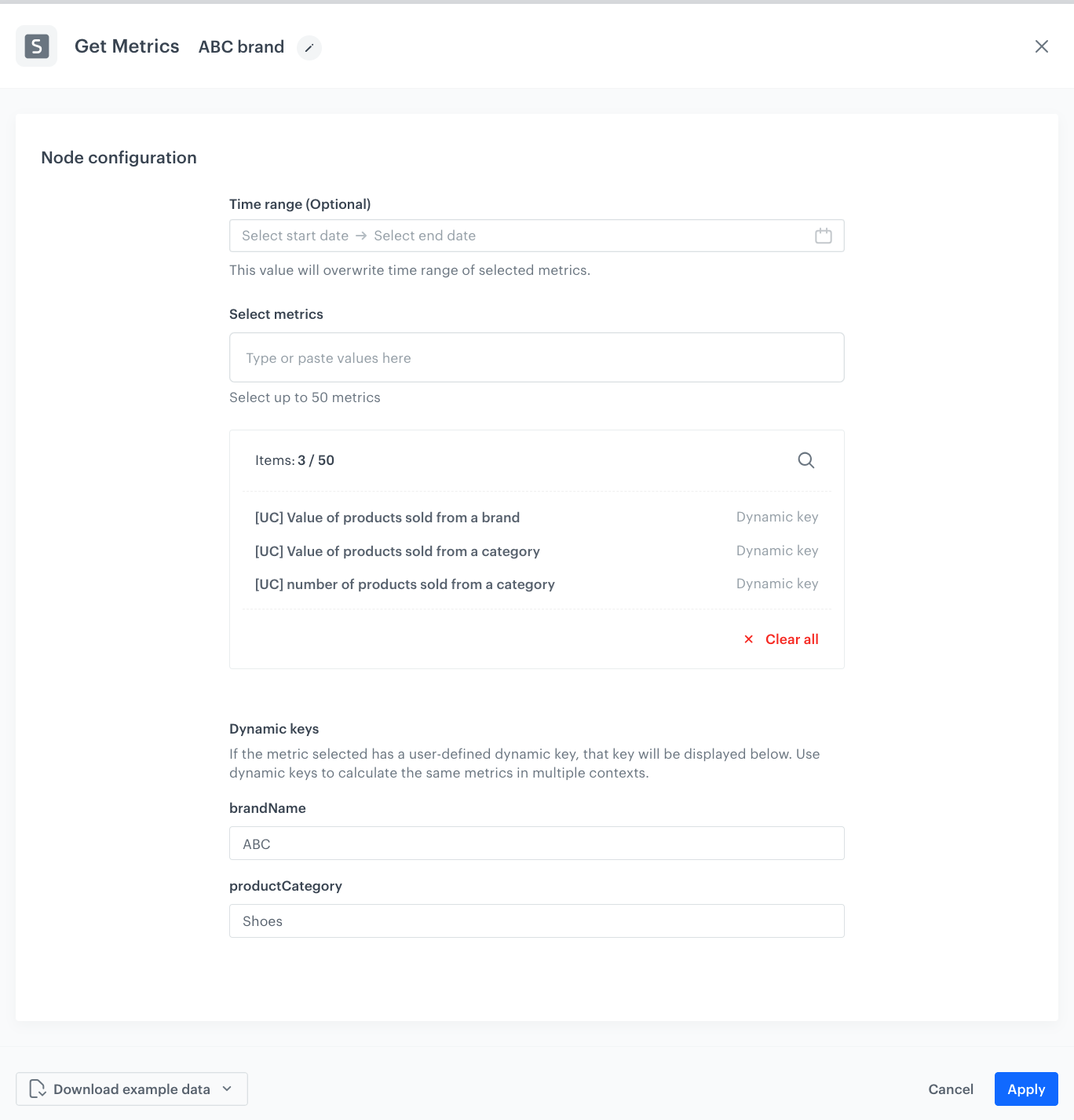
With Dynamic Keys, you can parameterize metrics with dynamic values. This means that the metric configuration can include flexible placeholders whose values can be defined at the metric export configuration level. This approach eliminates redundancy, enhances automation, and ensures scalability—especially when dealing with large datasets, multiple brands, or diverse reporting requirements. By minimizing the need to create and manage numerous individual metrics, teams can focus on analyzing insights rather than maintaining complex metric structures.
Why it matters
- More scalable reporting setups: One metric definition, endless contextual use cases.
- Simplified maintenance: No need to manage dozens of nearly identical metrics.
- Smarter automation: Make decisions based on the right data, passed dynamically.
With Dynamic Keys, your metrics become more agile, your workflows more intelligent, and your reporting infrastructure ready for anything at scale.