
Feature Overview
Dashboard Cloning is a feature in Synerise that enables cloning entire analytical dashboards — including all nested analyses, mappings, and rules — from one workspace to another. The feature supports public editable, public readable, and private dashboards.
The feature is available in the Analytics module in Synerise.
What Is Dashboard Cloning?
Dashboard Cloning extends the existing analysis cloning capability in Synerise to cover entire dashboards. When a dashboard is cloned, all underlying analyses, logic, mappings, and rules are duplicated in the target workspace. The feature works with public editable, public readable, and private dashboards, maintaining their integrity and configuration across workspaces.
Why Dashboard Cloning Matters
Recreating complex dashboards with multiple nested analyses in a new workspace is time-consuming and error-prone. Without dashboard-level cloning, teams must manually recreate each analysis and its configuration — leading to inconsistencies across workspaces.
Dashboard Cloning addresses this by:
- Enabling one-click cloning of entire dashboards with all nested analyses
- Preserving all underlying logic, mappings, and rules in the cloned copy
- Supporting all dashboard visibility types (public editable, public readable, private)
- Ensuring reporting consistency across multiple workspaces
Key Capabilities
Full dashboard duplication
Clone entire dashboards — not just individual analyses — including all nested components, logic, and configurations.
Cross-workspace cloning
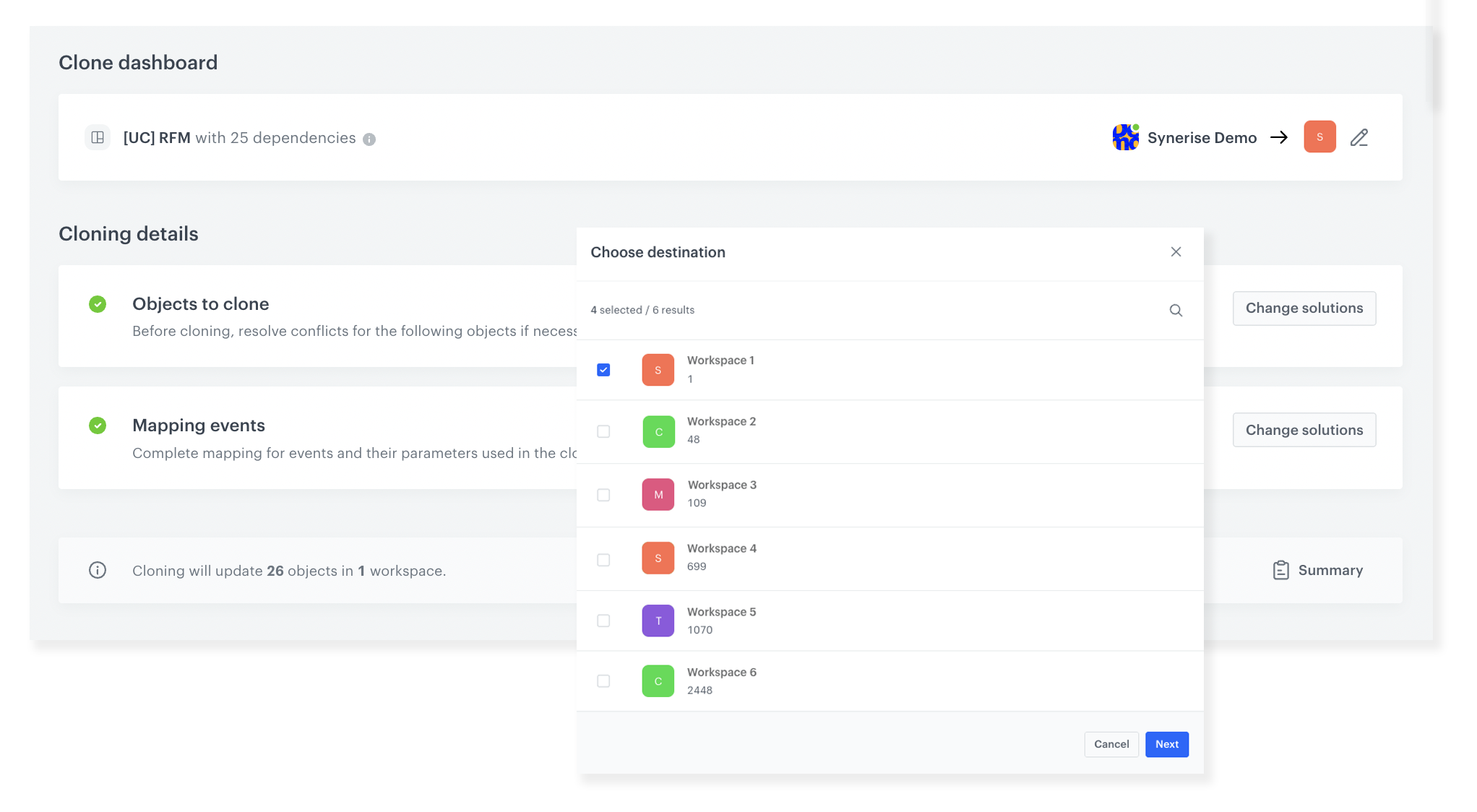
Clone dashboards to one or more target workspaces, enabling consistent analytics configurations across organizational units.
All dashboard types supported
Public editable, public readable, and private dashboards can all be cloned while maintaining their visibility and permission settings.
Event mapping
During cloning, the system prompts for event mappings specific to the target workspace, ensuring the cloned dashboard works correctly with the target workspace's data.
How Dashboard Cloning Works
- Select the dashboard to clone.
- Choose the destination workspace(s).
- Complete mappings for events used in the cloned analyses.
- Initiate the cloning process.
- The dashboard with all nested analyses is duplicated in the target workspace(s).
Example Use Case
A company operates separate Synerise workspaces for its B2B and B2C divisions. The analytics team builds a comprehensive KPI dashboard in the B2C workspace with 15 nested analyses tracking conversion rates, customer lifetime value, and campaign performance. Using Dashboard Cloning, they duplicate the entire dashboard to the B2B workspace, complete event mappings for the B2B data model, and have a consistent reporting setup in minutes — instead of recreating 15 analyses manually.
FAQ
What is Dashboard Cloning?
A feature that clones entire analytical dashboards — including all nested analyses, mappings, and rules — from one workspace to another.
Does it clone all nested analyses?
Yes. All underlying analyses, logic, mappings, and rules within the dashboard are duplicated.
Which dashboard types can be cloned?
Public editable, public readable, and private dashboards.
Can I clone to multiple workspaces?
Yes. You can select one or more target workspaces during cloning.
Key Facts
| Attribute | Value |
|---|---|
| Feature | Dashboard Cloning |
| Product | Synerise |
| Module | Analytics |
| Purpose | Clone entire dashboards with nested analyses to other workspaces |
| Dashboard Types | Public editable, public readable, private |
| Dependencies | All nested analyses, logic, mappings, and rules included |
| Documentation | hub.synerise.com — Cloning Analyses |
Related Concepts
- Cloning Campaigns and Workflows
- Analytics module in Synerise
- Cross-workspace operations
- Redesigned Workflow Statistics
- Query Suggestions Statistics
TL;DR
Dashboard Cloning in Synerise enables cloning entire analytical dashboards — including all nested analyses, logic, mappings, and rules — from one workspace to another. The feature supports public editable, public readable, and private dashboards. Event mappings are completed during cloning to ensure compatibility with the target workspace's data model.




