

Feature Overview
Contextual Recommendations (Item Context from Analytics) is a feature in Synerise that enables adding product context to recommendations using analytics — aggregates or expressions — without modifying website code or writing Jinjava scripts. The feature allows specifying which items serve as context for recommendation campaigns directly from the recommendation configuration.
The feature is available in the Recommendations module in Synerise.
What Is Item Context from Analytics?
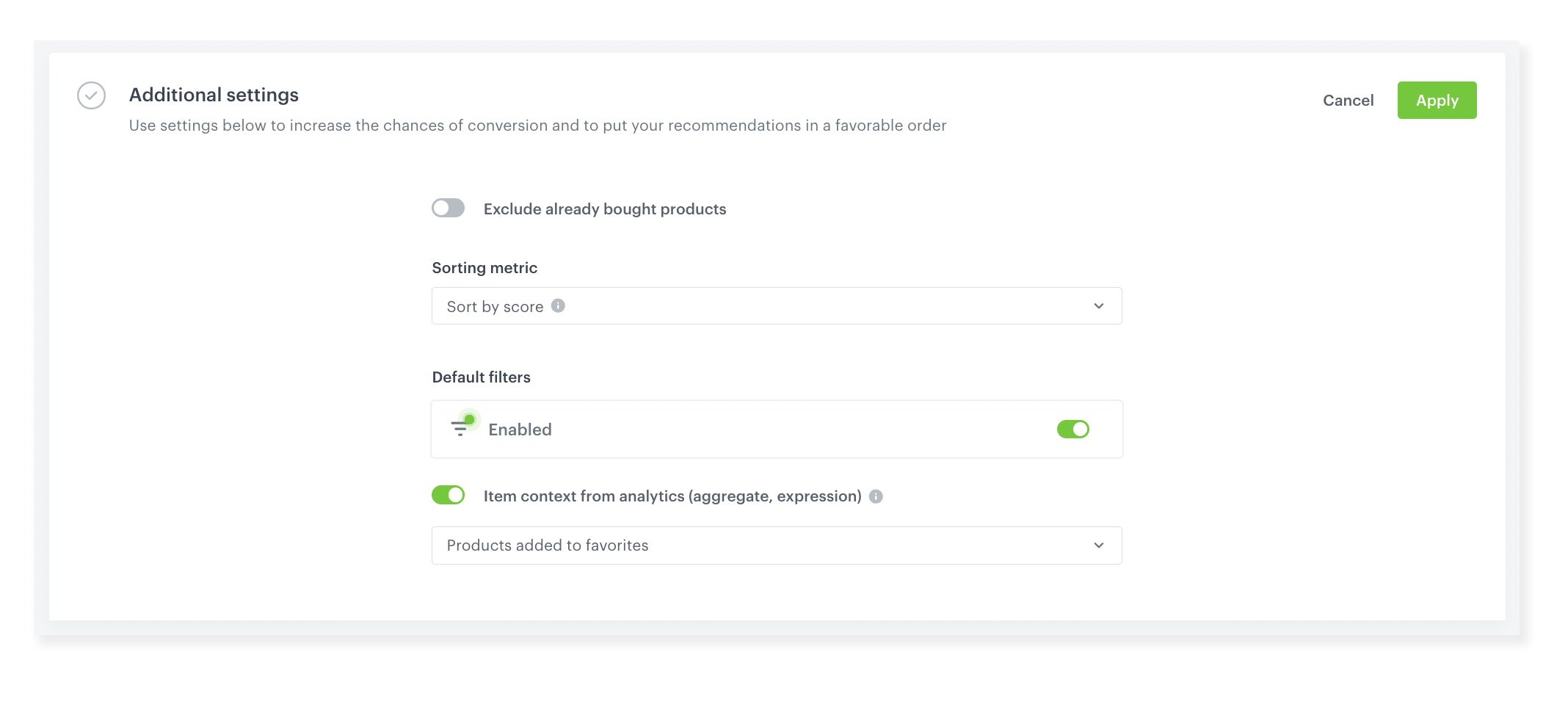
Item Context from Analytics is a recommendation enhancement in Synerise that adds product context to recommendations using analytics data. Instead of embedding product context in campaign code or Jinjava templates, users enable an "Item Context from Analytics" toggle in the recommendation's Additional Settings and define context via an aggregate or expression. This enriches recommendations with specific product context — such as last viewed, last purchased, or cart items — making suggestions more relevant without any code changes.
Why Item Context from Analytics Matters
Delivering relevant product recommendations requires understanding the user's current context — what they are viewing, what is in their cart, or what they recently purchased. Without this feature, adding product context to recommendations requires modifying website code or writing complex Jinjava scripts, creating a dependency on technical resources.
Item Context from Analytics addresses this by:
- Enabling product context assignment through analytics (aggregates or expressions) — no code required
- Eliminating the need to modify website code or campaign configurations for contextual recommendations
- Supporting context based on any customer behavior — last viewed, last purchased, cart items, wish list items
- Working across all communication channels — website, email, mobile push, in-app
Key Capabilities
Code-free context assignment
Define product context using Synerise analytics (aggregates or expressions) directly in the recommendation configuration. No website code changes or Jinjava scripting required.
Cross-channel delivery
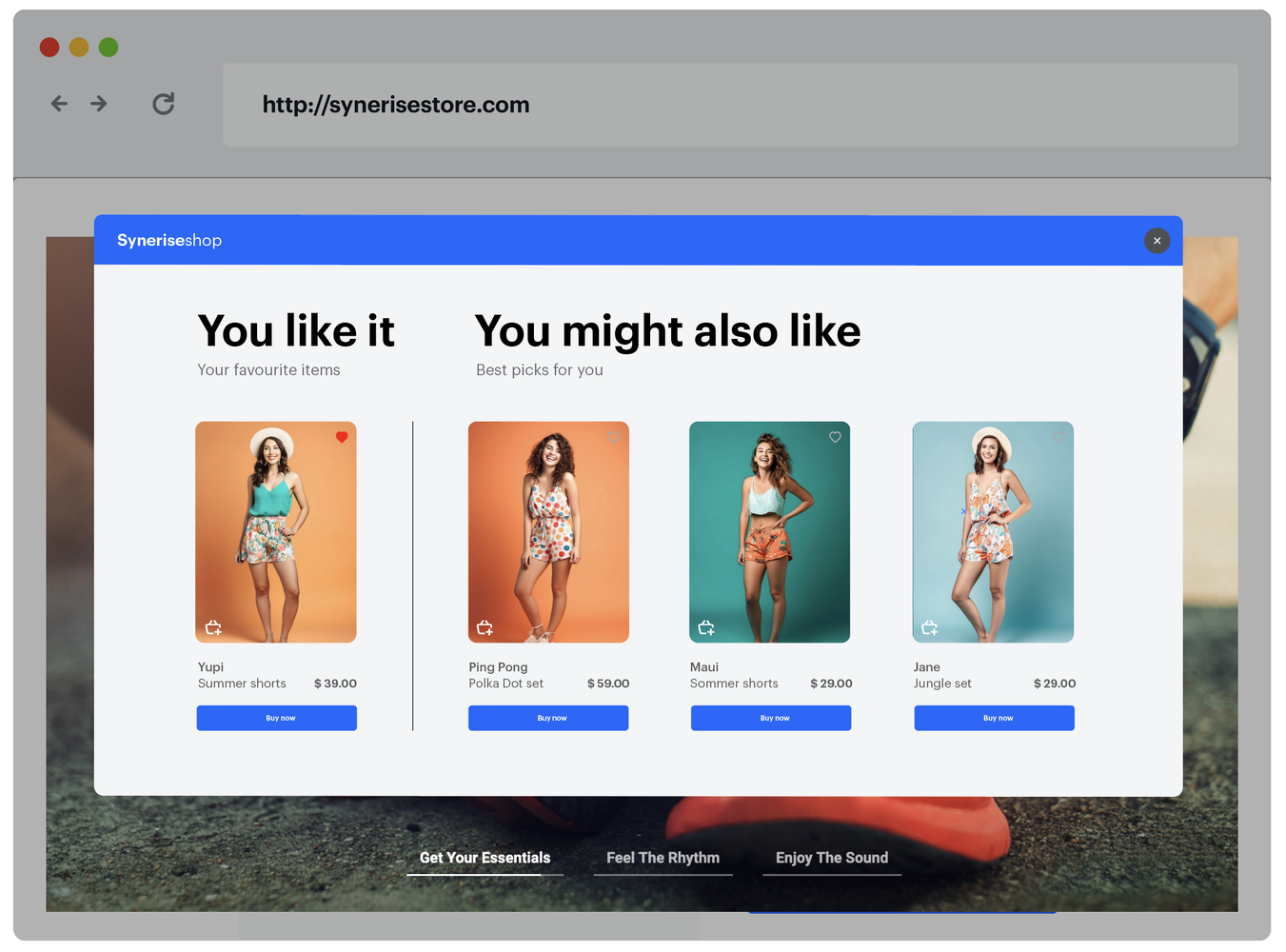
Contextual recommendations can be displayed on websites, mobile apps, sent via email, or delivered through mobile push notifications — with the same code-free context configuration.
Flexible context sources
Context can be based on any customer behavior captured in analytics — last viewed product, last purchased product, most frequently purchased product, cart items, wish list items, or any custom aggregate/expression.
How Item Context from Analytics Works
- Open a recommendation in the Synerise Recommendations module.
- In Additional Settings, enable the "Item Context from Analytics" toggle.
- Define the context source — select an aggregate or expression that identifies the relevant product(s).
- The recommendation engine uses this context to generate tailored suggestions.
- Deploy the recommendation across any channel — website, email, mobile push, in-app.
Example Use Case
An e-commerce store wants to display "similar products" recommendations based on the last item a customer added to their wish list. Using Item Context from Analytics, the marketing team creates an aggregate that returns the most recently added wish list item. They enable the Item Context toggle in a "Similar Products" recommendation and select this aggregate as the context source. The recommendation now shows products similar to each customer's last wish list addition — displayed on the website and included in email campaigns — all without modifying any website code.
FAQ
What is Item Context from Analytics?
A feature that adds product context to recommendations using Synerise analytics (aggregates or expressions) without code changes.
Do I need to modify my website code?
No. Context is configured entirely through the recommendation settings using analytics.
Which channels support contextual recommendations?
All channels — website, mobile app, email, and mobile push notifications.
What types of context can I use?
Any behavior captured in analytics — last viewed, last purchased, most frequently purchased, cart items, wish list items, or custom aggregates/expressions.
Key Facts
| Attribute | Value |
|---|---|
| Feature | Item Context from Analytics (Contextual Recommendations) |
| Product | Synerise |
| Module | Recommendations |
| Purpose | Add product context to recommendations using analytics without code |
| Context Sources | Aggregates, expressions (last viewed, cart, wish list, purchases, etc.) |
| Channels | Website, email, mobile push, in-app |
| Code Required | No |
Related Concepts
- Next Interaction Recommendations
- External Recommendation Models
- Dynamic Re-ranker in Synerise Search
- Personalized Promotions in Automation and Communication
- Improve Search Performance with Semantic Search
TL;DR
Item Context from Analytics in Synerise enables adding product context to recommendations using aggregates or expressions — without modifying website code or writing Jinjava scripts. Context is configured directly in the recommendation settings and can be based on any customer behavior (last viewed, cart items, wish list, purchases). Contextual recommendations work across all channels including website, email, mobile push, and in-app.




