
Feature Overview
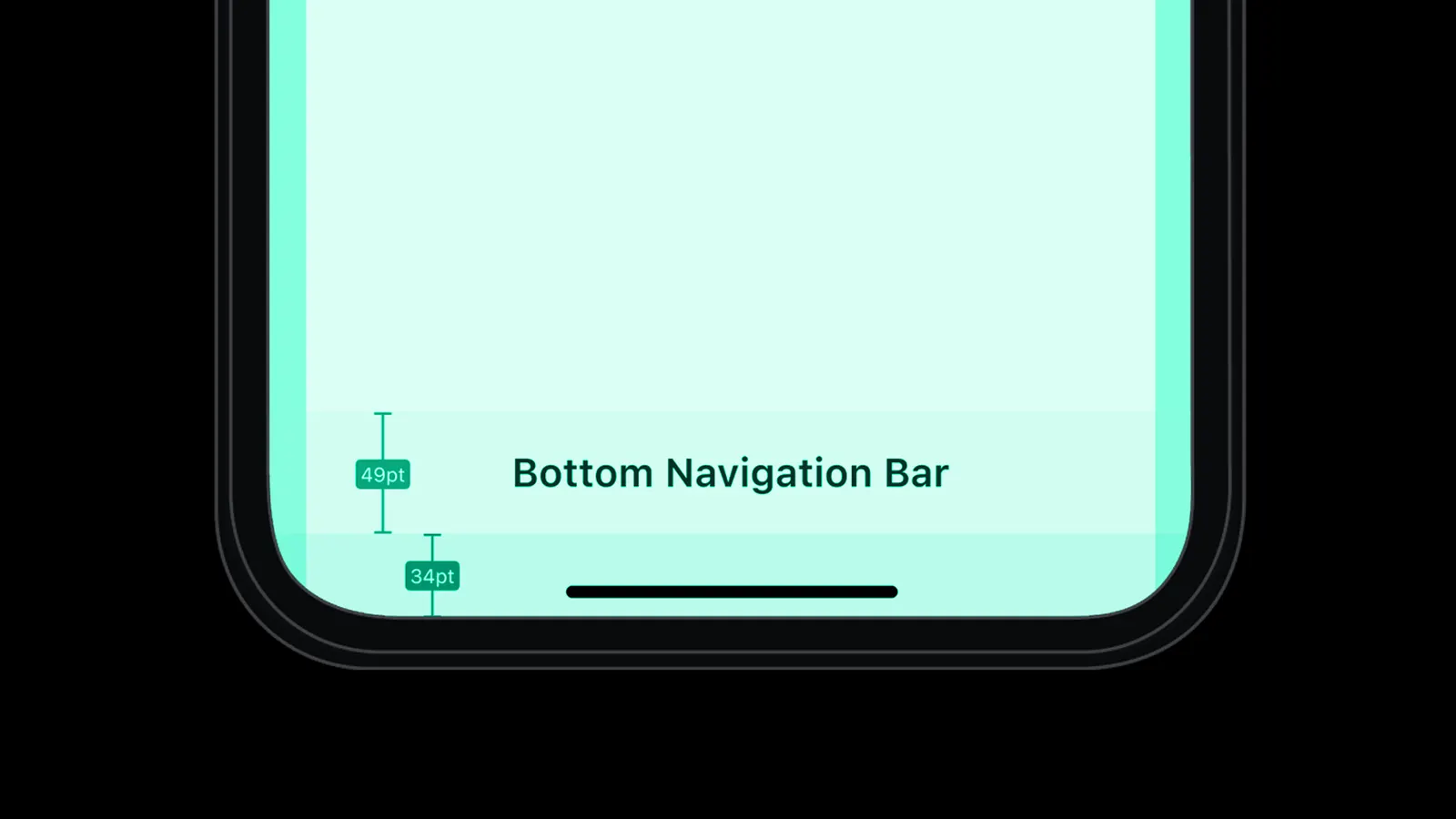
Safe Area Mode is a configuration option for in-app messages in Synerise that controls whether content overlays system UI elements (status bar, home indicator, notches) or stays within designated safe areas on the screen. The feature gives marketers visual flexibility and creative control over how in-app campaigns are displayed across different device types and layouts.
The feature is available in the in-app message template configuration in Synerise.
What Is Safe Area Mode?
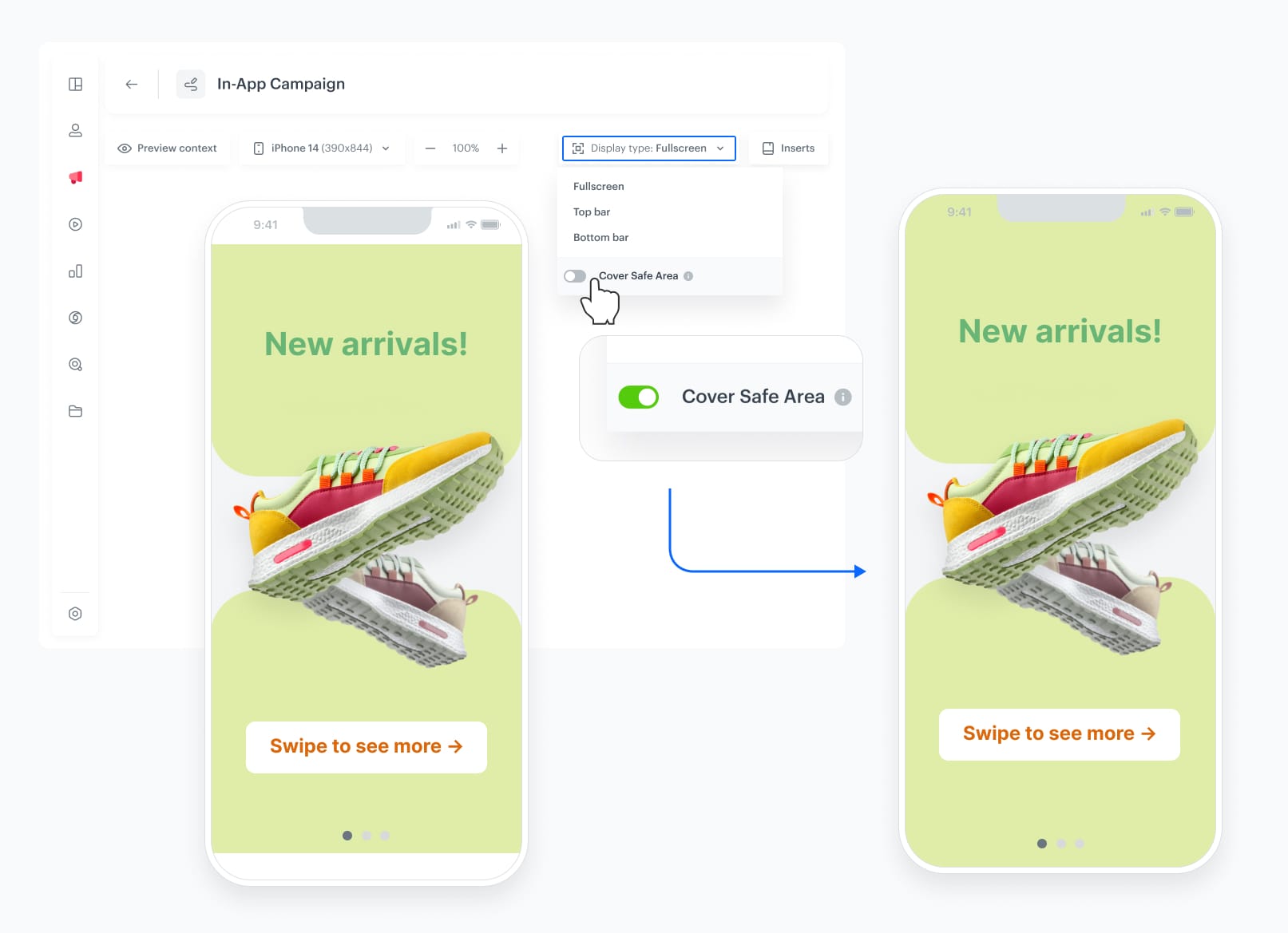
Safe Area Mode is a display configuration for in-app messages in Synerise that determines whether messages can extend beyond the device's safe area — covering system UI elements like the status bar, home indicator, and notches — or remain within the safe zone. When enabled, in-app messages cover the full screen for an immersive experience. When disabled (default), messages stay within designated safe areas. The feature supports visual customization of elements outside the safe area (shadows, icon overlays, background colors) and applies to any in-app format including full-screen, top-bar, and custom layouts.
Why Safe Area Mode Matters
Modern mobile devices have varying screen shapes — notches, dynamic islands, rounded corners, and system UI elements. Without control over safe area behavior, in-app messages may either look inconsistent across devices or miss the opportunity for immersive full-screen experiences.
Safe Area Mode addresses this by:
- Giving control over whether in-app messages overlay or respect system UI elements
- Supporting immersive full-screen experiences when safe area mode is enabled
- Allowing visual customization (shadows, overlays, background colors) outside the safe area
- Applying to any in-app format: full-screen, top-bar, and custom layouts
Key Capabilities
Full-screen overlay mode
When safe area mode is enabled, in-app messages cover the entire screen including notches, status bar, and home indicator — creating a distraction-free, immersive experience.
Visual customization outside safe area
Users can adjust visual effects, shadows, icon overlays, and background colors for the area outside the safe zone — directly from the template code.
Format-agnostic configuration
Safe area mode settings can be applied to any in-app format — full-screen, top-bar, or custom layouts — providing consistent control across different campaign types.
How Safe Area Mode Works
- Navigate to in-app message template configuration in Synerise.
- Locate the Safe Area Mode option (disabled by default).
- Enable safe area mode to allow messages to cover the full screen including system UI elements.
- Optionally customize visual effects (shadows, overlays, background colors) for the area outside the safe zone.
- Preview and deploy the in-app campaign.
Example Use Case
A fashion brand launches an in-app story campaign with full-bleed lifestyle photography. With Safe Area Mode enabled, the story images extend edge-to-edge on all devices — including those with notches and dynamic islands — creating an immersive visual experience. The team configures a semi-transparent gradient overlay in the status bar area to ensure the close button remains visible while maintaining the full-screen aesthetic.
FAQ
What is Safe Area Mode?
A configuration option that controls whether in-app messages overlay system UI elements (status bar, notches, home indicator) or stay within designated safe areas.
Is it enabled by default?
No. Safe area mode is disabled by default. When disabled, in-app messages stay within the device's safe area.
Which in-app formats support it?
All formats: full-screen, top-bar, and custom layouts.
Can I customize the area outside the safe zone?
Yes. Visual effects, shadows, icon overlays, and background colors can be adjusted for the area outside the safe zone via code.
Key Facts
| Attribute | Value |
|---|---|
| Feature | Safe Area Mode |
| Product | Synerise |
| Module | In-App Communication (Campaigns) |
| Purpose | Control whether in-app messages overlay or respect system UI elements |
| Default | Disabled (messages stay within safe area) |
| Supported formats | Full-screen, top-bar, custom layouts |
| Customization | Shadows, icon overlays, background colors outside safe zone |
| Documentation | hub.synerise.com — In-App Templates |
Related Concepts
- In-app message templates in Synerise
- In-app campaign design and customization
- Dedicated On-Device Storage for In-App Communication
- New In-App Templates in Synerise
- Mobile SDK integration
TL;DR
Safe Area Mode in Synerise controls whether in-app messages overlay system UI elements (status bar, notches, home indicator) or stay within designated safe areas. Disabled by default, enabling it creates immersive full-screen experiences. Visual customization (shadows, overlays, background colors) is available for the area outside the safe zone. The feature applies to all in-app formats: full-screen, top-bar, and custom layouts.




