- Year: 2026
- Author: Kamil Gaczoł
- Category: Product
- Benefits: Real-time visibility on the canvas, Flexible time ranges, Instant Activation, Campaign-level insights in context , Future-ready architecture
- YouTube share link: https://www.youtube.com/embed/PQy7cOHtc1g?cc_load_policy=1&cc_lang_pref=en&rel=0
- Security & Performance: No
- Featured?: No
- Quarter only: fe2d257f9b00112c9e9c7daf74b6b74c
- Module: 4c6698dca829ee8a0fcb167b62e6d5d0
Understanding how your automations perform should be effortless, and the statistics experience should match the power of the workflows you build. With the latest Automation release, we've completely redesigned workflow statistics from the ground up, delivering a richer, more intuitive experience that keeps performance data front and center on the canvas. New visualization options, flexible time ranges, and deeper per-node insights make it easier than ever to monitor, validate, and optimize every step of your workflow in real time.
What's New
We've completely rebuilt the statistics experience inside Automation with a set of capabilities designed to keep you informed without breaking your flow.
- Adjustable time range on the canvas
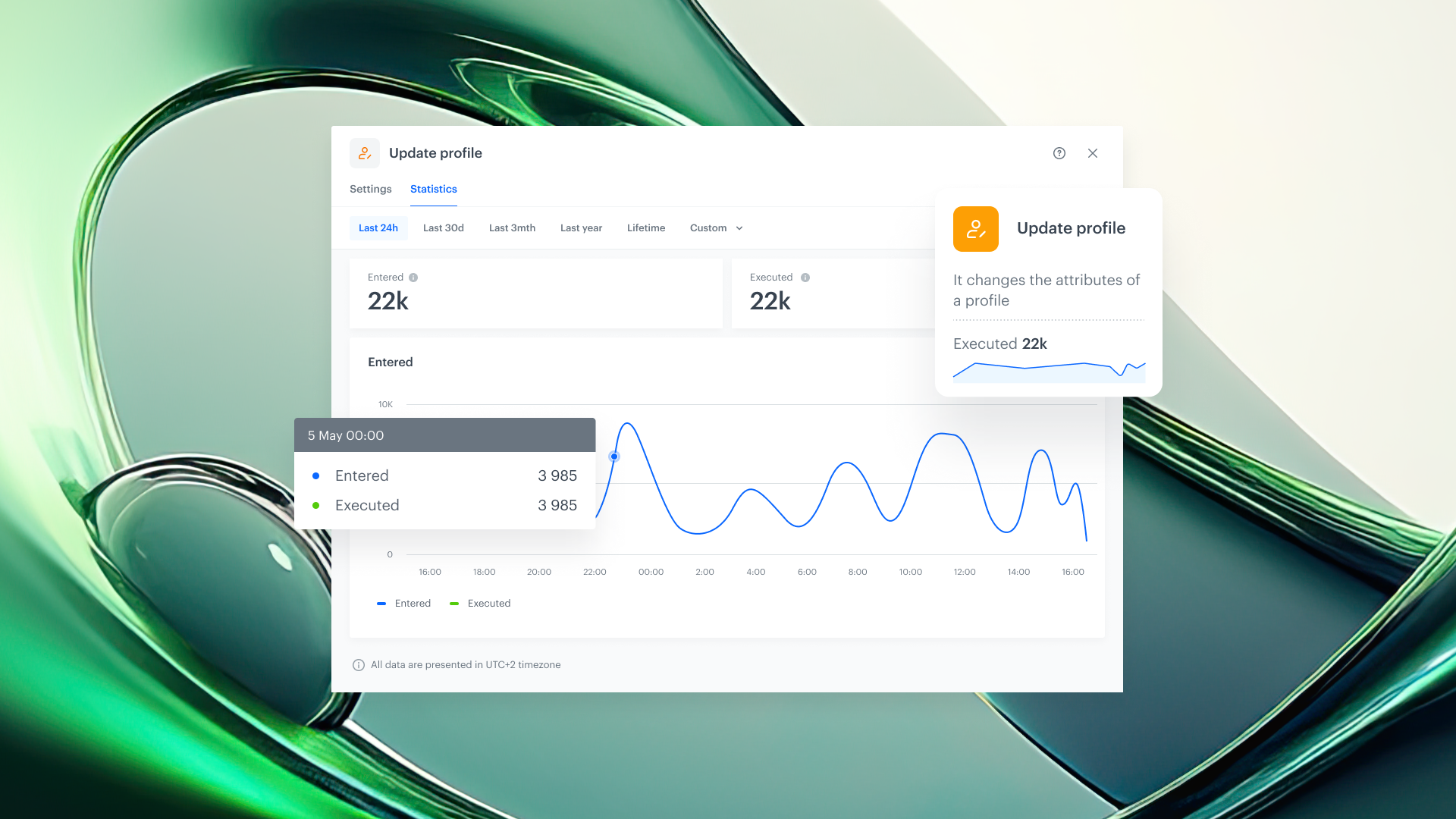
You can now change the time range of statistics displayed directly on each node, whether you need a snapshot of the last hour or a trend over the last 7 days. No more navigating away; the data adapts to your question. - Node Heartbeat
Every node now features a heartbeat: a simplified inline chart that gives you an at-a-glance overview of executions over time. Think of it as a vital sign for each step of your workflow: one quick look tells you whether things are running smoothly or something needs attention. - Dedicated statistics in node details
Opening any node's details now reveals a dedicated statistics section with deeper performance data, so you can drill into execution counts, trends, and patterns without leaving the editor. - Campaign statistics for sending nodes
Sending nodes such as email, SMS, or push now include a dedicated campaign statistics section. Track delivery, engagement, and performance metrics for every communication step, all in context. - Statistics on a timeline
All statistics are now presented on an interactive timeline, making it easy to identify spikes, drops, or anomalies across any period. Visualize execution patterns and correlate them with campaign events or external factors.
Why It Matters
1. Faster decision-making
When performance data lives directly on the canvas, you don't need to hop between tools or wait for reports. You see the current state of your workflow the moment you open it, and you can act immediately.
2. Proactive monitoring
The heartbeat and timeline views make it easy to catch irregularities before they become problems. Spot a sudden drop in executions, investigate a spike in send failures, or validate that a newly deployed workflow is performing as expected, all in real time.
3. Built to grow
The new statistics architecture isn't just a visual refresh, it's a foundation. Expect new metrics, deeper drill-downs, and expanded monitoring capabilities in future releases, all built on this solid base.