
Feature Overview
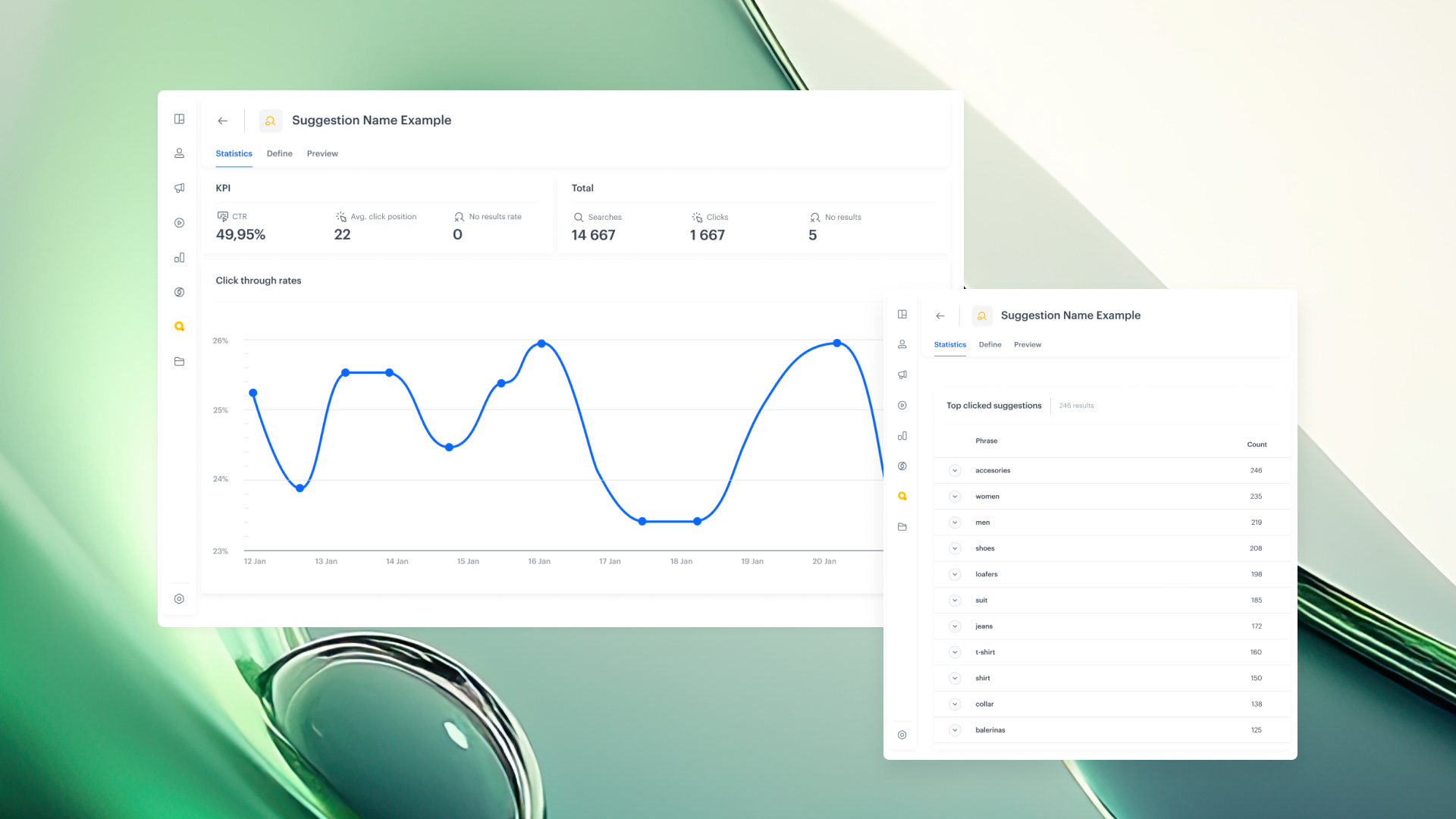
Query Suggestions Statistics is a capability in Synerise AI Search that provides full analytics for how users interact with query suggestions — including autocomplete and real-time search completions. The feature introduces automatic event tracking for every suggestion generated and clicked, a dedicated analytics dashboard, and zero-code campaign analysis for AI Search suggestion performance.
The feature is available in the Suggestions Index within the Synerise AI Search module.
What Are Query Suggestions Statistics?
Query Suggestions Statistics is an analytics feature in Synerise AI Search that automatically tracks and visualizes user interactions with search suggestions. Every suggestion generated is saved as a suggestion.search event, and a standardized suggestion.search.click event is available for tracking clicks on suggestions. A dedicated dashboard in the Suggestions Index provides instant access to metrics like CTR, no-results rate, and top clicked suggestions — with no additional implementation required.
Why Query Suggestions Statistics Matter
Without dedicated suggestion analytics, understanding how users interact with search autocomplete requires custom event implementation, manual dashboard setup, and separate analysis workflows. This makes it difficult to evaluate whether suggestions are driving meaningful engagement or to identify optimization opportunities.
Query Suggestions Statistics address this by:
- Automatically tracking every suggestion generated as a
suggestion.searchevent — no custom event implementation needed - Providing a standardized
suggestion.search.clickevent for tracking user clicks on suggestions - Including a dedicated dashboard with instant metrics visualization directly in the Suggestions Index
- Enabling zero-code AI Search campaign analysis with automatic tracking and built-in dashboards
Key Capabilities
Automatic suggestion event tracking
Every suggestion generated by AI Search is automatically tracked and saved as a suggestion.search event. This eliminates the need for custom event implementation to capture suggestion data.
Standardized click tracking
A standardized suggestion.search.click event is provided for tracking when users click on a suggestion. This enables consistent measurement of suggestion engagement across all search implementations.
Dedicated analytics dashboard
A built-in dashboard is accessible directly from the Suggestions Index. It provides instant visualization of key metrics without requiring additional setup or dashboard configuration.
Key metrics
The dashboard tracks the following metrics:
- CTR — Click-through rate on suggested phrases
- Total — Overall search outcomes for comparison against suggestion-driven results
- No Results Rate — Frequency of searches that yield no results or suggestions
- Top Clicked Suggestions — Most engaged suggestion phrases, showing what resonates with users
How Query Suggestions Statistics Work
- AI Search generates suggestions as users type in the search box.
- Each suggestion generated is automatically saved as a
suggestion.searchevent. - When a user clicks on a suggestion, a
suggestion.search.clickevent is recorded. - Navigate to the Suggestions Index in AI Search to access the dedicated analytics dashboard.
- Review CTR, no-results rate, top clicked suggestions, and other metrics — no setup required.
Example Use Case
An e-commerce company uses Synerise AI Search for product discovery. With Query Suggestions Statistics, the merchandising team monitors which autocomplete suggestions drive the most clicks and which lead to no-results searches. They discover that "summer dress" suggestions have a high CTR while "waterproof jacket" suggestions frequently lead to no results. The team uses this insight to optimize the suggestion index — adding relevant products and adjusting suggestion rankings to improve search-driven conversion.
FAQ
What are Query Suggestions Statistics in Synerise?
Query Suggestions Statistics is an analytics feature in AI Search that automatically tracks suggestion events, provides click tracking, and includes a dedicated dashboard for measuring suggestion performance.
Do I need to implement custom events for suggestion tracking?
No. Suggestion events (suggestion.search) are generated automatically. The suggestion.search.click event is standardized for click tracking.
Where is the analytics dashboard located?
The dashboard is accessible directly from the Suggestions Index in the Synerise AI Search module.
What metrics are available?
CTR, total search outcomes, no-results rate, and top clicked suggestions are available out of the box.
Key Facts
| Attribute | Value |
|---|---|
| Feature | Query Suggestions Statistics |
| Product | Synerise |
| Module | AI Search (Suggestions Index) |
| Purpose | Automatic tracking and analytics for search suggestion interactions |
| Events | suggestion.search (auto), suggestion.search.click (standardized) |
| Dashboard | Built-in, accessible from Suggestions Index |
| Setup required | None — zero-code analytics |
| Key metrics | CTR, total, no-results rate, top clicked suggestions |
Related Concepts
- Synerise AI Search
- Search autocomplete and query suggestions
- Search analytics and optimization
- Event tracking in Synerise
- Campaign performance measurement
TL;DR
Query Suggestions Statistics in Synerise AI Search automatically tracks every suggestion generated (suggestion.search event) and provides a standardized click event (suggestion.search.click). A built-in dashboard in the Suggestions Index shows CTR, no-results rate, and top clicked suggestions — with no custom implementation or setup required. The feature enables zero-code analysis of AI Search suggestion performance.




