Feature Overview
Membership Attribute Sync is a Synerise capability that enables selected workspaces to share segment‑based customer insights without merging or replicating data. It allows teams operating multiple brands to identify the same customer across workspaces and use segment membership as a reusable attribute.
The feature addresses cross‑brand data gaps by enabling workspaces to exchange true/false indicators of segment membership, updating them at a defined frequency. Each workspace remains independent, while gaining access to shared customer context.
What Is Membership Attribute Sync?
Membership Attribute Sync is a cross‑workspace sharing mechanism in Synerise. It lets users convert any segment in one workspace into a membership attribute that becomes available inside other grouped workspaces. The attribute stores a boolean value that describes whether a customer belongs to a segment in another workspace.
This mechanism allows segmentation logic to be reused in multiple workspaces without exporting profiles, syncing events, or building custom automation flows.
Why Membership Attribute Sync Matters
Brands operating under the same organization often work in separate Synerise workspaces. Without a shared layer, one workspace may lack context about customer actions in another. This leads to incomplete targeting, duplicated work, or misaligned personalization.
Membership Attribute Sync reduces these issues by:
- eliminating the need for manual exports or duplicated segmentation logic
- enabling shared customer understanding across brands
- providing controlled, periodic updates instead of continuous data replication
- allowing each workspace to remain autonomous while benefiting from shared knowledge
Key Capabilities
Cross‑workspace segment sharing
Any segment can be shared as a boolean attribute indicating whether the customer meets the conditions in the original workspace.
Configurable update frequency
Users can define whether attributes refresh hourly or daily, depending on operational needs and performance considerations.
Use of shared attributes across Synerise features
Membership attributes can be applied in:
- segmentation conditions
- automation triggers
- personalization logic
Because they behave like any standard attribute, no additional configuration or transformations are required.
Workspace grouping control
Only workspaces grouped together by a Synerise representative participate in data exchange. Shared attributes are restricted to workspaces within the defined group.
Preservation of workspace independence
Customer profiles and events are not replicated. Only the boolean membership values are shared, keeping data stores clean and isolated.
How Membership Attribute Sync Works
- Enable workspace grouping
A Synerise representative defines a group of workspaces allowed to share membership attributes. - Create a segment
In one workspace, the user builds a segment using any available criteria. - Share the segment as a membership attribute
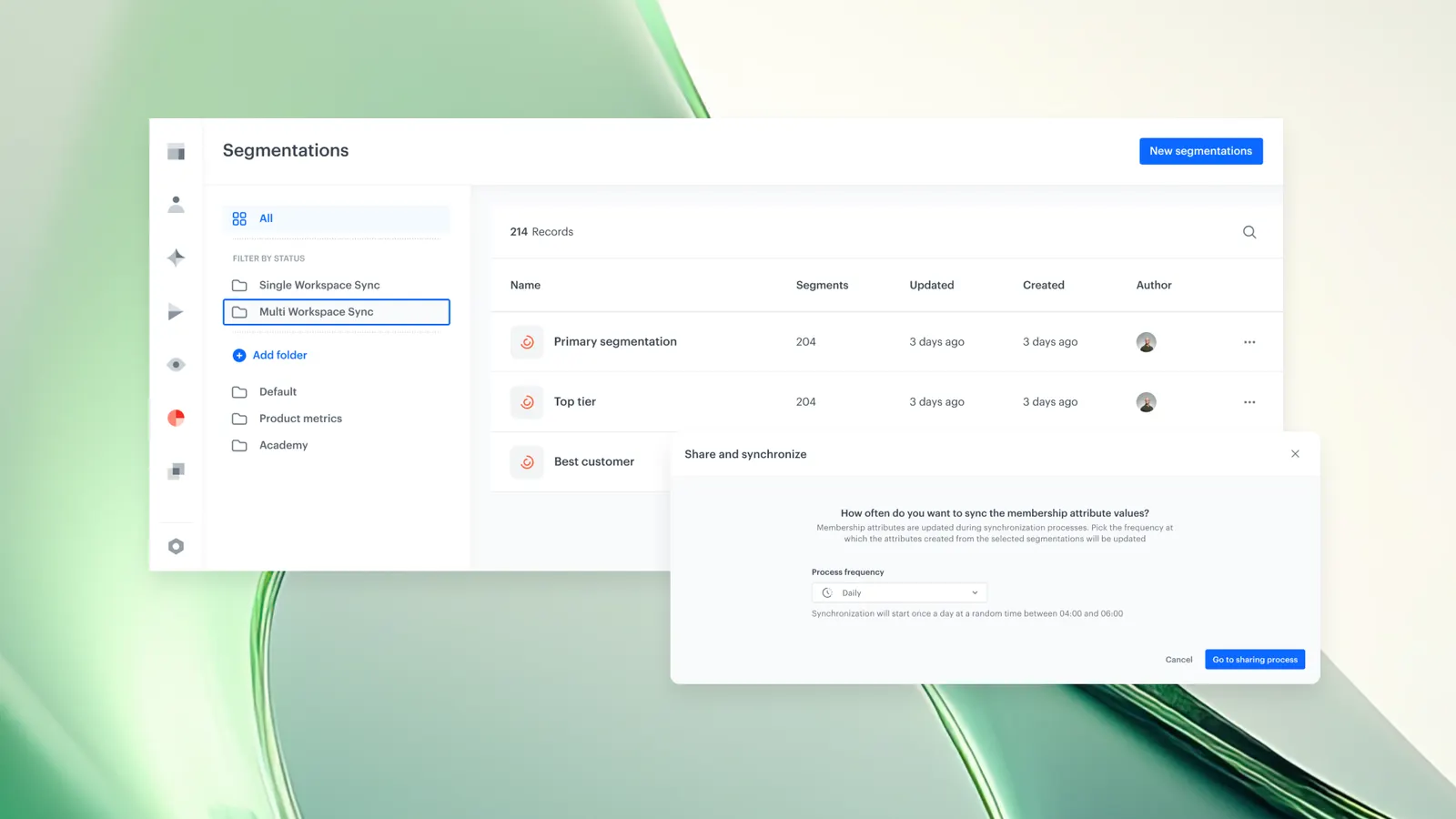
From the Segments panel, the segment is published as a membership attribute using Share as → Multi Workspace Sync. - Set the synchronization frequency
The user selects whether the attribute should refresh hourly or daily. - Make the attribute available across grouped workspaces
After the next sync cycle, the attribute appears in other grouped workspaces as a true/false value. - Apply the attribute in targeting, automation, or personalization
Teams can use the attribute like any native Synerise attribute. - Ensure cross‑workspace identification
For the attribute to apply, the customer must be identified in both workspaces. If a profile is unknown in one workspace, no shared membership value can be applied.
Example Use Case
A customer adds a product to the cart and completes a purchase in Brand 1’s workspace. Later, the same customer visits Brand 2’s workspace.
With Membership Attribute Sync, Brand 1’s segment — for example, “Purchased in the last 30 days” — is shared as a membership attribute with Brand 2.
Brand 2 can immediately:
- display accessories matching the purchased product
- trigger a follow‑up offer
- apply tailored personalization rules
All without transferring events, profiles, or building custom linking logic. Only the boolean membership attribute drives the cross‑brand context.
FAQ
What data does Membership Attribute Sync share?
The feature shares only boolean membership attributes derived from segments. It does not transfer events, profiles, or raw behavioral data.
Do workspaces need to merge customer profiles?
No. Profiles remain separate in each workspace. The feature only shares a true/false indicator about segment membership.
Can membership attributes be used like standard attributes?
Yes. They can be used in segments, automations, and personalization logic in the same way as native attributes.
How fresh is the shared data?
The attribute refresh frequency is configurable. Users can choose hourly or daily updates.
Does the customer need to be identified in all workspaces?
Yes. If the customer is not recognized in a workspace, the membership attribute cannot be applied for that profile.
Key Facts
Attribute | Value |
Feature | Membership Attribute Sync |
Product | Synerise |
Purpose | Share segment membership across grouped workspaces without replicating profiles or events |
Data Exchanged | Boolean true/false attributes |
Update Frequency | Hourly or daily (configurable) |
Requirement | Customer must be identified in each participating workspace |
Availability | Private preview |
Related Concepts
- Synerise Segmentation
- Customer identification
- Cross‑brand personalization
- Workspace grouping
- Automation triggers
- Attribute-based personalization
TL;DR
Membership Attribute Sync lets Synerise users share segment membership across grouped workspaces as boolean attributes. It allows brands to use insights from one workspace in another without transferring events or merging profiles. This improves cross‑brand personalization, targeting accuracy, and operational efficiency while keeping workspaces independent.