Feature Overview
Synerise now supports exporting Brickworks schema records directly from Automation Hub. Users can generate one‑time file exports or configure recurring, automated export workflows that deliver data to external systems. This capability centralizes structured data extraction and enables periodic synchronization without manual work.
What Is Brickworks - schema records export?
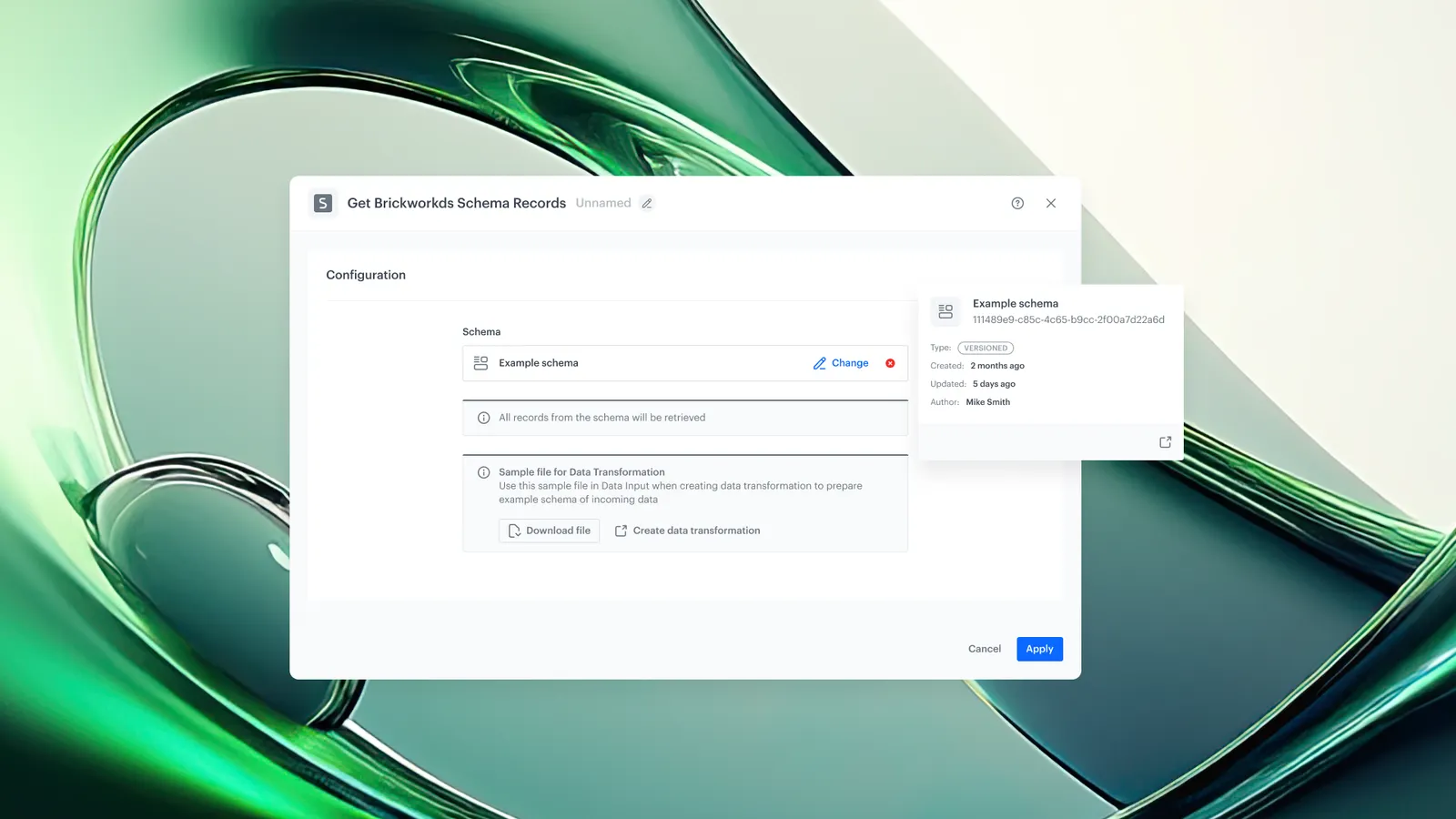
Exporting Brickworks Schema Records is a capability in Synerise Automation that retrieves data stored in Brickworks schemas and outputs it as CSV, JSON or JSON Lines files. The feature includes both an immediate single‑file export option and an automation node called Get Brickworks Schema Records, which allows the export to be part of larger, scheduled workflows.
Why Brickworks - schema records export Matters
Teams often need structured data from Brickworks—such as contents—outside Synerise for reporting, analytics, machine learning pipelines, or synchronization with third‑party systems. Manual extraction is time‑consuming and introduces risk. Automation‑based exports provide predictable, repeatable delivery of consistent datasets with clear governance and auditability.
Brickworks already gives you complete schema flexibility for modeling structured content. Now, you can effortlessly take that data outside Synerise for reporting, analytics, machine learning pipelines, or synchronization with third‑party systems. Whether you maintain catalogs, loyalty content, or any structured dataset - automation‑based exports provide predictable, repeatable delivery of consistent datasets with clear governance and auditability.
Key Capabilities
Single File Export
Users can export a file immediately without creating a workflow. This is suited for ad‑hoc needs such as reviewing schema content or generating a one‑off dataset.
Export via Automation Workflows
Using the Get Brickworks Schema Records node, users can create automated, recurring export pipelines that retrieve schema records and deliver them to external storage platforms or make them available for download.
Integration with External Storage
Exported files can be connected to:
- Amazon S3 using the Send File to Amazon S3 node
- Google Cloud Storage using the Send File to Google Cloud Storage node
These nodes allow workflows to push records directly to external data platforms.
File Storage in Synerise
Using the Save File node, users can store the exported file inside Synerise. Files are available under Data Modeling → Exports
Data Preview Before Export
Users can view sample data to verify schema layout and confirm that the exported output meets requirements.
Data Transformation Prior to Export
By using the Data Transformation node before the export step, datasets can be modified to match external system specifications.
User Logs and Role-Based Permissions
All export actions are logged for auditing. Granular permissions determine who can trigger or configure exports, supporting controlled data governance.
How Brickworks - schema records export Works
- Navigate to schema records you want to export.
- Select the export option ('Export single file' or recurring - 'Export in Automation').
- If one-time: name your export. The export job is created in Data Modeling -> Exports.
- If recurring: name your export, choose where you want to export the file.
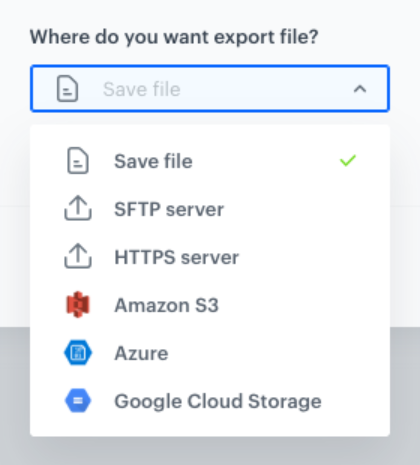
The system opens an Automation template. Configure according to your needs.
- Monitor export progress in Data Modeling -> Exports using structured execution logs.
- Download the generated file once the export completes.
Example Use Case
A team maintains a banner catalog inside a Brickworks schema and needs to update an external platform daily to have all data in one place. They create an Automation Hub workflow that uses Get Brickworks Schema Records to extract catalog entries every morning, applies a transformation to match the analytics platform’s required format, and then uses Send File to Amazon S3 to deliver the file. The workflow runs automatically without manual participation.
FAQ
Is the feature generally available?
The feature is in private preview. Interested users should contact their customer representative.
What file formats are supported?
The export can produce CSV, JSON or JSON Lines files.
Can exported files be downloaded from Synerise?
Yes. By using the Save File node, files become available under Data Modeling → Exports
Can the export be triggered manually?
Yes. The single‑file export option allows ad‑hoc downloads without creating a workflow.
Can data be transformed before exporting?
Yes. The Data Transformation node can be added to modify the dataset before delivery.
Key Facts
| Attribute | Value |
|---|---|
| Feature | Exporting Brickworks Schema Records |
| Product | Synerise |
| Module | Automation Hub |
| Purpose | Retrieve Brickworks schema data as CSV/JSON/JSONL and deliver it via file download or automated workflows |
| Preview | Private preview (requires contacting a customer representative) |
| Output formats | CSV, JSON, JSON Lines |
| Delivery options | Amazon S3, Google Cloud Storage, Synerise file storage |
Related Concepts
- Brickworks schemas
- Synerise Automation workflows
- Data Transformation node
- External storage integrations (S3, GCS)
- Data governance and audit logs
TL;DR
Synerise now allows exporting Brickworks schema records as JSON/JSONL through immediate single‑file downloads or automated workflows. Using the Get Brickworks Schema Records node, teams can build recurring export pipelines, transform data, and deliver files to Amazon S3, Google Cloud Storage, or Synerise’s internal file storage. The feature adds audit logs and role‑based controls to support governed data movement.