Subtitles available in English, Spanish, Brazilian Portuguese
Feature Overview
Catalog data exports in Synerise now use the platform's unified export framework. Users can initiate one-time or recurring exports directly from any catalog, with full visibility into execution through detailed logs. The export framework supports CSV, JSON, and JSONL formats and integrates with the same automation templates used across Synerise.
This update removes fragmentation in export workflows and provides a single, repeatable method for generating, monitoring, and managing catalog data exports.
What Is Unified Data Export for Catalogs?
Unified Data Export for Catalogs is a capability in Synerise that allows users to export catalog data using the platform's centralized export framework. Instead of using separate export mechanisms for different data types, catalog exports now run on the same infrastructure as other Synerise exports, providing consistent configuration, execution, and monitoring across all export scenarios.
Users can trigger exports directly from a catalog interface and monitor progress in the Data Modeling ->Exports section of the platform.
Why Unified Data Export for Catalogs Matters
Your catalog data is now easier than ever to move, share, and activate. Move it to other systems and services or analyze it further using your preferred tools. This flexibility makes it simple to extend the value of your catalog data wherever it’s needed. Use it to power reporting, enrichment, analytics, machine learning, backups, or offline sync - whatever your workflow demands.
Recurring exports run on the same framework used across Synerise, with ready-made templates and detailed logs so every team member can set up, run, and verify exports with confidence.
Key Capabilities
Run one-time exports from any catalog
An export job is created in Data Modeling -> Exports. Users choose their format — CSV, JSON, or JSONL — and download the file immediately. No additional configuration or manual steps are required for one-time exports.
Launch recurring exports using Automation templates
Users can configure repeatable export workflows directly from a catalog. The system opens a pre-built Automation template that can be customized with scheduling, format selection, and destination settings. Recurring exports run automatically based on the defined schedule.
Track execution with structured logs
Every export generates detailed logs that show:
- export initiation time
- processing stages
- completion status
- file generation details
- any errors or warnings
These logs are accessible in Data Modeling -> Exports and provide full visibility into export execution.
How Unified Data Export for Catalogs Works
- Navigate to the catalog you want to export.
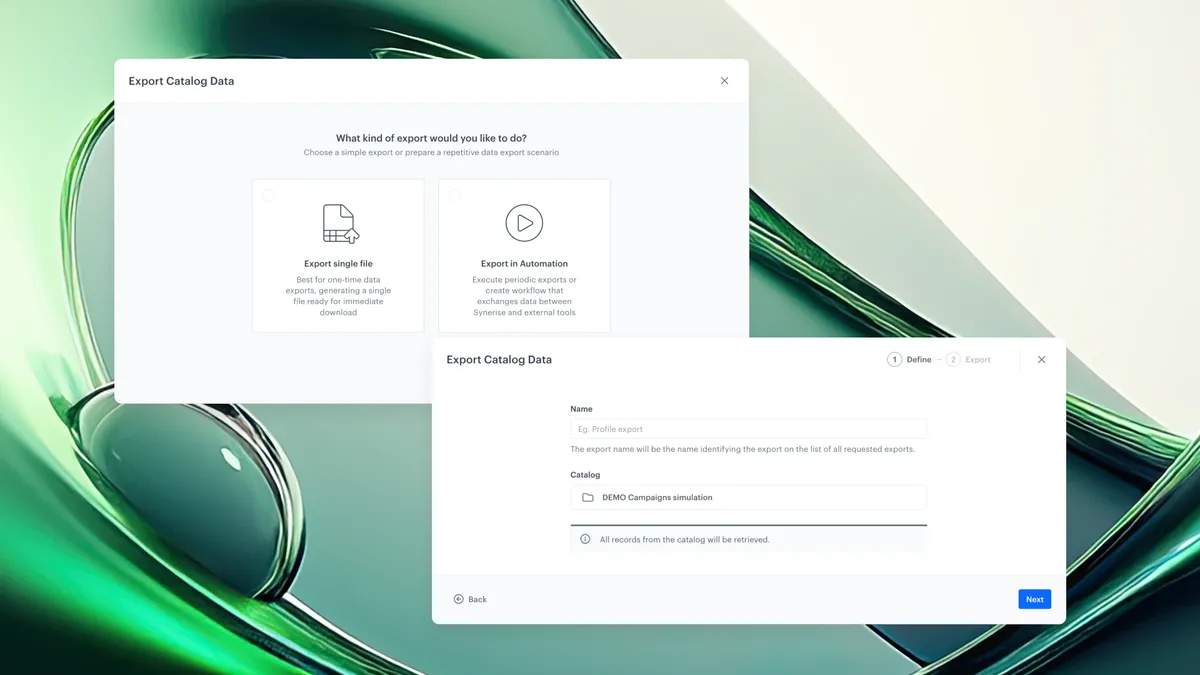
- Select the export option ('Export single file' or recurring - 'Export in Automation').
- If one-time: name your export. The export job is created in Data Modeling -> Exports.
- If recurring: the system opens an Automation template. Configure according to your needs.
- Monitor export progress in Data Modeling -> Exports using structured execution logs.
- Download the generated file once the export completes.
Example Use Case
A retail company manages a product catalog in Synerise that includes prices, availability, and promotional flags. Their data team needs to sync this catalog daily with an external BI tool for inventory reporting and with a machine learning pipeline for personalized recommendations.
Using the unified export framework, they configure a recurring export directly from the catalog using an Automation template - no custom scripting required. They select JSONL format and set the schedule to run nightly. Every night, the export runs automatically and delivers an up-to-date JSONL file to their data warehouse.
FAQ
What is a catalog export in Synerise?
A catalog export is the process of generating a file containing data from a Synerise catalog. This file can be downloaded or sent to external systems for reporting, analytics, machine learning, or offline synchronization.
What file formats are supported for catalog exports?
Catalog exports support CSV, JSON, and JSONL formats.
Can catalog exports run on a recurring schedule?
Yes. Users can configure recurring exports using Automation templates. These templates allow scheduling, format selection, and destination configuration without custom scripting.
Where are catalog exports monitored?
All catalog exports are visible in Data Modeling -> Exports. This section provides structured logs that show export progress, completion status, and any errors.
What is the difference between one-time and recurring exports?
One-time exports generate a file immediately and must be triggered manually each time. Recurring exports run automatically on a defined schedule using Automation templates.
Key Facts
| Attribute | Value |
|---|---|
| Feature | Unified Data Export for Catalogs |
| Product | Synerise |
| Module | Data Modeling ; Exports |
| Purpose | Export catalog data to external systems using the platform's unified export framework |
| Supported formats | CSV, JSON, JSONL |
| Export types | One-time, recurring |
| Monitoring | Structured execution logs in Data Modeling ; Exports |
| Recurring exports | Configured using Automation templates |
Related Concepts
- Synerise Automation templates
- Data Modeling in Synerise
- Catalog management
- Recurring data workflows
- Export execution logs
- JSONL format
- ETL and reverse ETL
TL;DR
Unified Data Export for Catalogs is a capability in Synerise that allows users to export catalog data using the platform's centralized export framework. Users can run one-time exports or configure recurring exports using Automation templates. All exports are monitored in Data Modeling -> Exports with detailed execution logs. This update standardizes catalog export workflows, reduces manual configuration, and provides full transparency into export execution.