Feature Overview
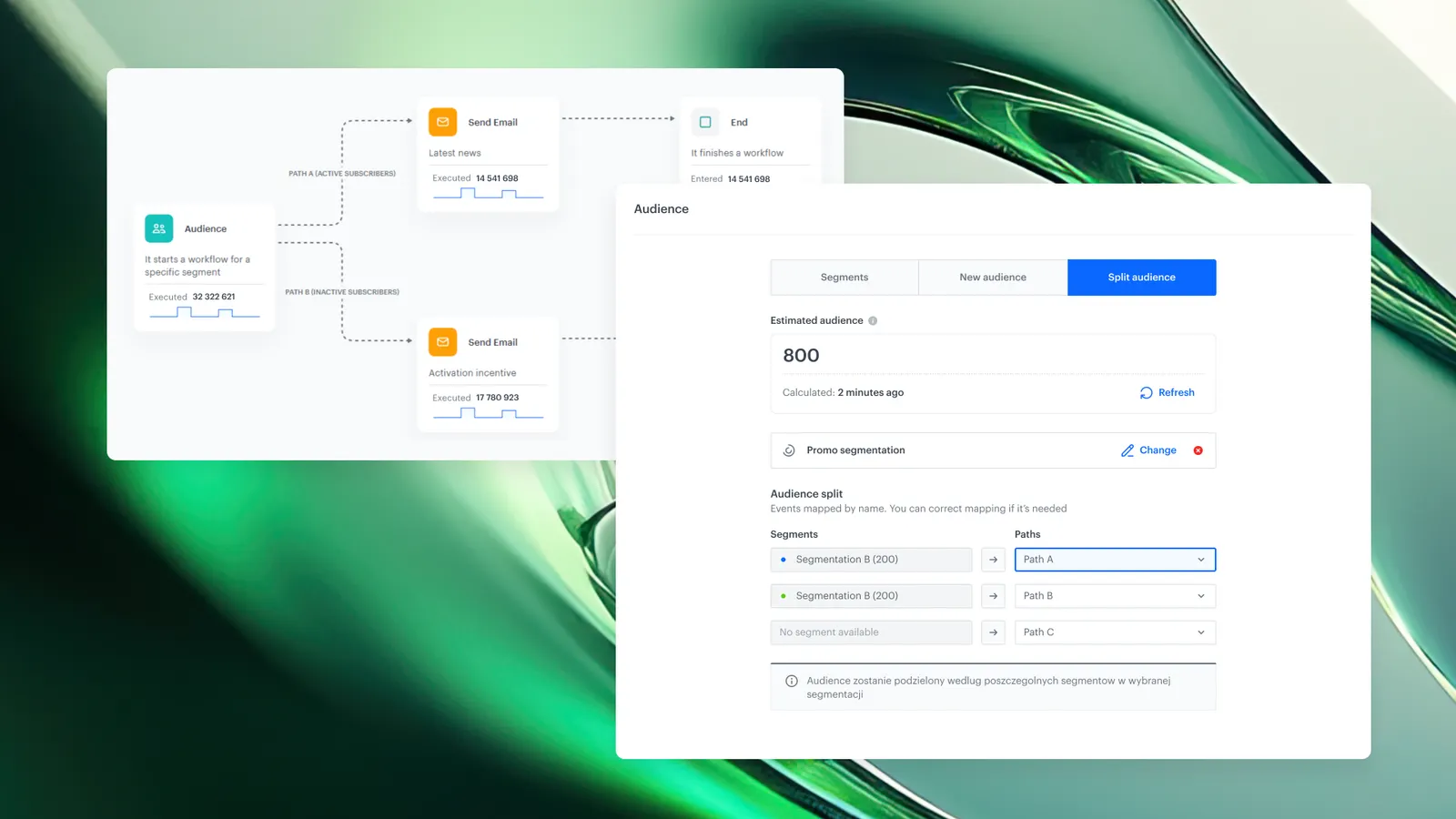
Split Audience path mapping in Synerise Automation is a capability that aligns segmentation results with the appropriate workflow paths within Audience and Profile Filter nodes. It ensures that the order of segments, also after updates, remains consistent with the corresponding node outputs (paths), enabling accurate user routing throughout the scenario.
This feature enables updating routing logic in active workflows without restarting or rebuilding automation. It solves the problem of misalignment between segmentation structure and workflow execution when segments are reordered or modified.
What Is Split Audience Path Mapping?
Split Audience path mapping is a configuration mechanism in Synerise Automation that allows users to define how segments from a segmentation are mapped to specific outputs (paths) in a workflow node.
Instead of relying on the order of segments in segmentation, users can explicitly assign each segment to a selected output path. The mapping is stored at the node level and can be updated independently of segmentation structure.
Why Split Audience Path Mapping Matters
Segmentation is often dynamic — segments can be reordered, added, or removed based on changing business logic.
Without explicit mapping:
- workflow paths may become inconsistent with segmentation
- automation may require manual rebuilding
- execution logic may become difficult to maintain
Split Audience path mapping reduces these issues by introducing direct control over routing logic inside the workflow.
Key Capabilities
Mapping of segments to workflow paths
Users can assign each segment from a segmentation to a specific output path using a dropdown configuration.
- mapping is independent of segment order
- mapping can be updated without restarting the workflow
Path-level control inside nodes
Each output path in the Audience or Profile Filter node can be configured individually.
- segments can be reassigned to different paths
- mapping reflects current segmentation logic
Runtime updates without workflow restart
Mapping changes can be applied to workflows in active states (other than Draft).
- no need to rebuild the workflow
- existing actions and paths remain intact
How Split Audience Path Mapping Works
- Modify the segmentation by changing segment order or structure.
- Open the workflow (must not be in Draft state).
- Navigate to the Audience or Profile Filter node.
- Open the Split Audience tab.
- Assign each segment to a workflow output using the dropdown field.
- Optionally disable selected paths.
- Save the configuration.
The workflow continues execution with updated routing logic.
Example Use Case
A marketing team manages a segmentation with three groups:
- High-value customers
- Active users
- Inactive users
The team changes segment priority by reordering the segmentation.
Using Split Audience path mapping:
- the team updates segment-to-path assignments in the node
- the workflow continues running without interruption
- profiles are routed according to the updated prioritization
FAQ
What is Split Audience in Synerise Automation?
Split Audience is a mechanism that routes profiles through different workflow paths based on segmentation results.
Can segment mapping be changed without restarting a workflow?
Yes. Mapping can be updated in active workflows (except Draft) without stopping execution.
In Draft mode, workflow changes do not require restart handling, so users can configure segment-to-path assignment directly in the node before activation.
What happens when a path is disabled?
Profiles assigned to the corresponding segment are not routed further within that node.
Does changing segmentation automatically update workflow paths?
No. After changing segmentation, mapping must be manually updated in the node configuration.
Where is path mapping configured?
Path mapping is configured in the Split Audience tab inside Audience or Profile Filter nodes.
Key Facts
| Attribute | Value |
|---|---|
| Feature | Split Audience path mapping |
| Product | Synerise |
| Module | Automation |
| Purpose | Align segmentation results with workflow paths |
| Configuration level | Node (Audience / Profile Filter) |
| Execution mode | Works in active workflows |
| Dependency | Segmentation definitions |
| Output | Routed profiles per assigned path |
Related Concepts
- Behavioral profiles
- Segmentation
- Automation workflows
- Event-driven processing
- Real-time decisioning
TL;DR
Split Audience path mapping in Synerise Automation allows users to manually assign segments to workflow paths and update routing logic in active workflows. This removes dependency on segment order and enables consistent execution without rebuilding automation.