
Overview
As highlighted in our previous articles, the gateway plays a crucial role in receiving responses from Query API Gateway, interacting with multiple workers to gather data, and performing operations on them when needed (such as returning the top 100 records or reducing the data to a single value, or the total income for a company over a given period). The gateway also plays a key role in supporting SQL syntax, allowing you to connect using any MySQL connector and send queries.
Some queries, like SELECT, can limit the amount of returned data (e.g., SELECT * FROM Customers LIMIT 1000;), so we want to fetch only a subset of the data. An effective approach is to communicate the desired number of records with the workers. Yet, in cases of intricate queries, determining the precise data requirement upfront may not be possible. To address this uncertainty, we implement streaming. By utilizing streaming, we can extract data in manageable chunks, ensuring we retrieve the necessary information without the need to know the total size beforehand.
Streaming proves useful in managing complex analytic queries, where the combined response from all workers could be several gigabytes. Rather than risking memory overflow by trying to fetch all the data at once, we can retrieve the data in smaller chunks, perform reductions on each chunk, and then fetch the next chunk when needed.
In this article, I’ll demonstrate how to implement a server and client for streaming data. We'll kick things off with a straightforward solution before diving into a more advanced coroutine mechanism featuring a generator.

Protobuf structure.
First, we need to define a protobuf structure for streaming. We can reuse the existing Request and Response objects from the Handle method. To enable streaming, we simply add the stream keyword before the Response in the method definition. Once this structure is defined, we can initiate streaming. Initially, we send a Request, and then, for each read operation, we receive a Response. In this case, each Response represents a chunk of data.
Listing 1. Example protobuf structure for a streaming request named Stream.
After defining the protobuf, we can set up a basic streaming mechanism. First, let's examine how we can implement this synchronously. While this approach works, it's inefficient because each Read method blocks the thread. If we need to read data from 2,160 workers, this results in frequent thread context switching, which can significantly impact performance.
Listing 2. Simple streaming method
Client-Side Streaming with Coroutines
To optimize the communication for streaming, we will switch to an asynchronous model using coroutines. By adopting this approach, we can avoid blocking entire threads and instead suspend the coroutine during data retrieval, resuming once the desired results when they are ready. Here’s how we can implement this:
- Create an object to hold request information: First, we need an object that will encapsulate all the necessary details about the request. This object will be used to manage the request lifecycle.
- Create an awaitable object: We need to define an Awaitable object that will allow the coroutine to suspend until the result is available. This object will handle the completion of the request when the response is received from the worker.
- Add streaming method to worker and workerManager: need to extend the worker class with a new method that supports streaming, as well as update the workerManager class to allow simultaneous querying of all workers.
Listing 3 illustrates modification of the RequestContext class to handle streaming data asynchronously. By adopting this method, the client can manage multiple data chunks as they arrive, all without hindering threads. The co_await mechanism will be used to suspend the coroutine while waiting for data, and once the data arrives, the coroutine will resume.
Listing 3. RequestContext class
After refactoring the RequestContext class, we can now initiate a stream and read as many data chunks as needed, or until the server sends everything. Since we will be overriding the awaitable object with each request (asyncStream, readNext, and finish), it is important to use a std::shared_ptr to ensure safety. Failing to do so could result in a dangling pointer situation when the object is overwritten. However, we have a more efficient solution for this challenge, which we will discuss later.
Key Methods for Streaming
- readNext: This method requests the server for the next chunk of data. Once the data becomes available, it triggers the coroutine for the associated awaitable object to resume, thus allowing for uninterrupted data reception without blocking the thread.
- Finish: The finish method is used to end the stream early when we have received all the data we need. It sends a signal to the server, telling it to stop streaming further data. This prevents unnecessary data transfer and helps control memory usage more effectively.
Rewriting the Worker Class to Support Streaming
Now, let's take a look at how we should update the Worker class to support the streaming functionality. The key changes revolve around managing multiple read operations and effectively handling the lifecycle of the request.
Listing 4. Worker class
The main drawback of returning RequestContext directly is that it exposes implementation details to the user, which we previously kept hidden. When dealing with a single request, the user remains unaware of this object's presence. Additionally, the issue of dangling pointers arises when the CompletionQueue disposes of the object at the end of streaming, requiring caution in its usage. Once the streaming concludes and the stop signal is received, the pointer will become invalid. In the upcoming Server implementation, I will demonstrate how we can use std::shared_ptr to eliminate manual memory management. But before that, let’s first explore how we can implement the stream method for the worker.
Listing 5. Reading streaming data.
After initiating a streaming request, we create a RequestContext, which generates the first awaitable. Access to this awaitable is granted by calling the awaitable() method, allowing for the wait as the streaming commences. Although not ideal, this method suffices for now. Once we explore generators, we’ll replace it with a more efficient approach. Next, when data needs to be read, the readNext method is called. Each invocation of readNext returns an Awaitable for the Response object. When starting the streaming, the response will be empty because no data has been read yet.
Listing 6. Use a RequestContext class to read data
The streamSomething function demonstrates how we can use RequestContext to read data. However, there's an issue with comparing the result to the string "FINISH" as it may pose a risk if the value "FINISH is valid message in the stream. To address this, we need to make some adjustments to the Response object. It should be a std::optional or std::unique_ptr, and when the streaming is finished, we should return std::nullopt or nullptr to signal the end of the stream. I’ll leave this modification up to you. For now, let’s move forward and explore a more solution for handling the coroutine part.
Coroutine Generator in C++20
Starting with C++20, it introduced support for coroutines, which allow writing asynchronous code in a more natural, sequential style. In C++23, the standard library introduced std::generator, a coroutine-based generator type. However, since we are assuming the use of only C++20 (Ubuntu requirements), we will need to implement our own generator mechanism.
A coroutine generator is essentially a coroutine that can produce a series of values over time, each time it's awaited. Instead of returning a single value, a generator yields multiple values across suspensions and resumptions, making it suitable for streaming data or lazy evaluation. Let's look at how we can implement our own generator based on C++20 coroutine functionality.
Basic Structure of a Generator
In C++20, coroutines are based on the co_await, co_return, and co_yield keywords. To implement a generator, we'll need to define a coroutine that yields values one at a time and allows the consumer to await the next value when ready.
Listing 7. Simple coroutine implementation
Now that we have our generator class, we can use it in the following way (listing 8).
Listing 8. Simple usage of generic coroutine generator.
Implementing a Simple Streaming Function with a Generator
Now that we've set up a basic coroutine generator capable of yielding values and managing exceptions, let's implement a simple streaming function. This function will use our generator to produce n values.
The key idea is that any function that uses the co_yield operator is a generator function. This allows us to create multiple objects or values as part of a single function call. When we want to stop producing values, we use the co_return operator to stop the coroutine. The operator bool will indicate whether there are more values to produce, and it will return false when the generator has finished.
We'll also introduce a full_ member, which acts as a safeguard to ensure that the coroutine doesn't resume twice when we've already reached the end of the stream.
Listing 9. Example generator function.

Based on listing 9 we can read that:
The generator class handles the lifecycle of the coroutine. It includes:
- A promise_type that defines the behavior of the generator (how it yields values, handles exceptions, and ends).
- The bool() operator checks if there are more values to be yielded (i.e., whether the coroutine has completed or not).
- The operator() method is used to resume the coroutine and get the next value. It also manages the full_ state to prevent multiple resumptions of the coroutine.
streamSomething Function:
- The streamSomething function takes an integer n and yields values from 0 to n - 1.
- It uses the co_yield operator to return each value, and once the loop ends, co_return ensures the generator completes.
- As long as bool() operator returns true, the generator will continue to yield values when operator() is called.
Main Loop:
- The main function creates a generator that will yield 5 values.
- It uses a while (gen) loop to keep calling gen() and printing the returned values until the generator finishes.
- Once the generator is done (when operator bool() returns false), the program exits the loop and prints "Stream finished!".
Now that we have everything in place, we can implement streaming functionality. The stream function should remain unaware of the details of coroutines. Instead, we invoke operator() on the generator object to produce a new value. When streaming stops, bool() operator will return false to indicate that there is no more data to yield. If we decide to terminate the streaming early, we simply return from the function, and the generator will be destroyed, thereby halting the streaming process. We need to implement similar logic in the coroutine to support stopping the streaming, just like we did in the finish method of the RequestContext class (refer to Listing 3).
At this point, we are almost ready to use the generator for streaming data. However, there is one key missing piece. The stream function from Listing 9 does not wait for data—it simply produces values. To address this, we need to introduce an awaitable object, which will allow us to co_await until the next chunk of data is ready. In the improved implementation shown in Listing 10, we wait for the data to become available before calling co_yield to return it.
Listing 10. Generator which suspends until new data appear.
With the current setup, we have devised elegant mechanism for streaming data, effectively concealing all implementation complexities from the end user. Users are not required to have any knowledge of RequestContext or initialization of streaming and waiting for completion of the first awaitable object.. Their only task is to call co_await to obtain the values. Additionally, users don't have to manage or even be aware of the awaitables themselves, as the generator handles the waiting for data and then co_awaiting it when it becomes available.
From the user's perspective, the process is simplified: they just call co_await operator(), and the value is produced, without the need for thread switching. The coroutine is suspended and resumed as needed, facilitating efficient data streaming.
Server side (without coroutines)
In this implementation, I will demonstrate how to set up an asynchronous mechanism without manually allocating and freeing memory. We'll use shared_ptr to manage memory automatically. Additionally, I'll show you how to implement this without relying on coroutines, because in scenarios with only a few simultaneous requests, thread switching can become a bottleneck. For example, when a gateway opens 10 streams per worker, that leads to 10 * 2160 = 21,600 parallel requests, and frequent thread switching can slow things down significantly. However, if a single worker only opens 10 streams, thread switching becomes negligible and performance is less affected.
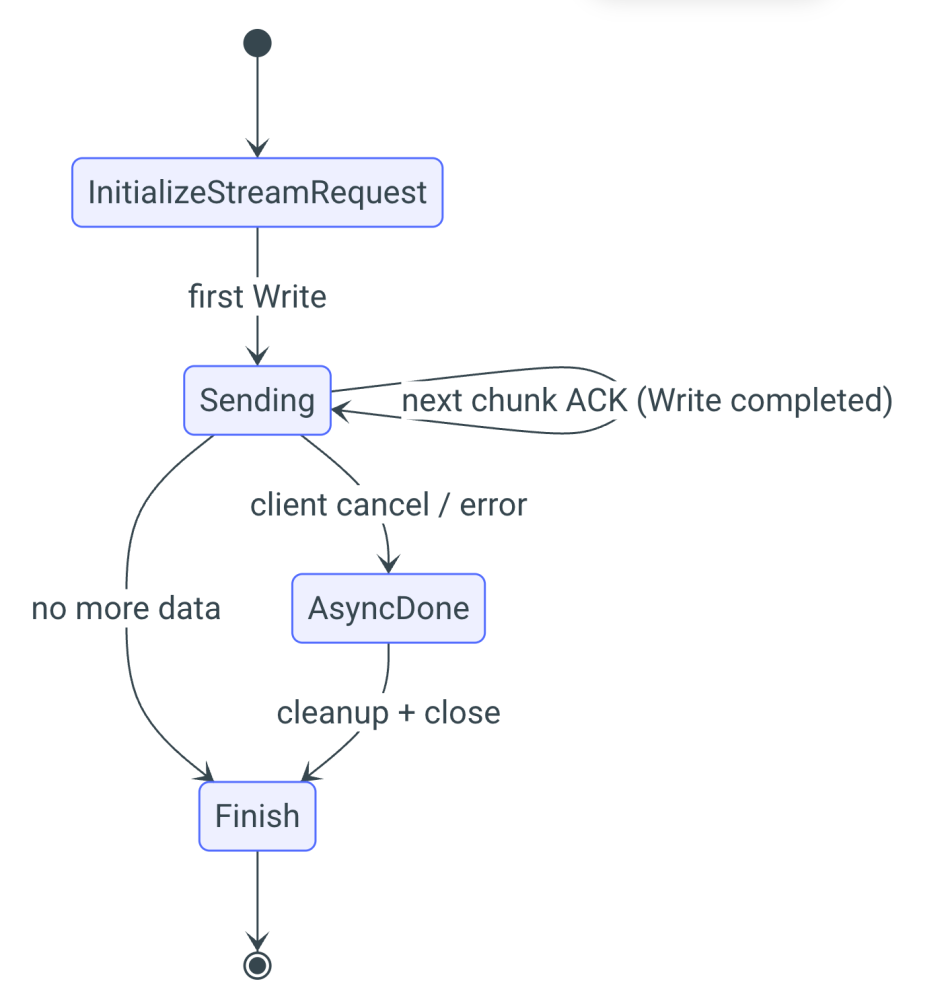
We will extend the previously implemented Handler class by adding a new method, InitializeStreamRequest. This method will create a dedicated StreamContext object responsible for managing the entire streaming process. Since streaming involves more complexity than a single request, we need to handle the following states: Pending, Sending, Finish, and AsyncDone.
- PendingTag: This state is triggered when streaming begins. It will be set when the server initializes a stream.
- SendingTag: This state is triggered every time new data is sent. It will be called when a chunk is received by the client, signaling that another chunk can be sent.
- Finish: This state is triggered when the stream is closed.
- AsyncDone: This state is called when the user cancels streaming in the middle or when the last chunk is sent.
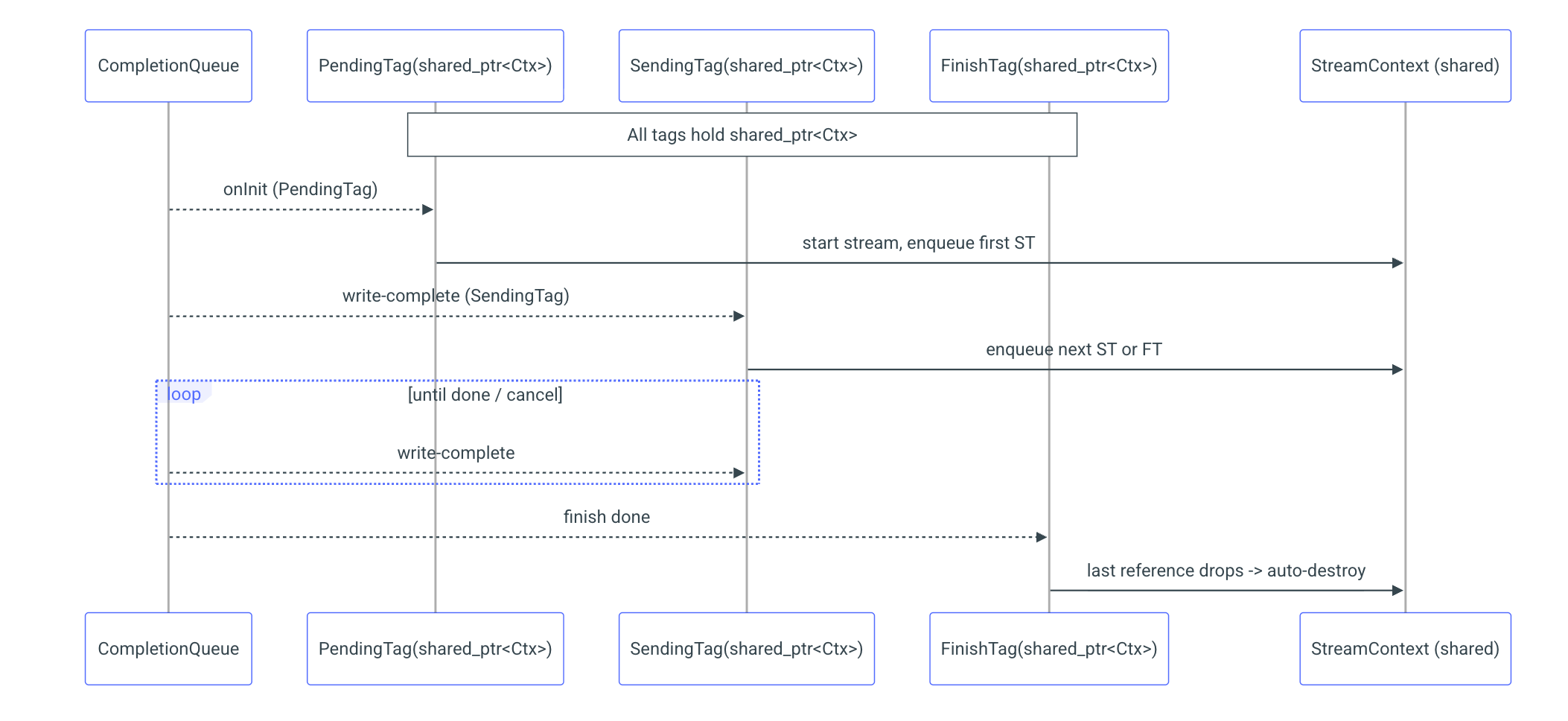
Since we don't want to manually manage the lifetime of objects, we've decided to use a reference-counting mechanism. C++ provides std::shared_ptr, which automatically tracks references to an object and destroys it when the last reference is released. This mechanism is thread-safe, making it ideal for our use case. Each state will be represented by a HandlerTag object, and each tag will hold its own copy of the shared_ptr to the StreamContext. When the last HandlerTag is processed, the request will no longer be in use and will be automatically freed, thanks to the shared_ptr's reference counting and automatic memory management.
Listing11. Request context class
gRPC allows for the initialization of one request at a time. While it can handle multiple requests simultaneously, the initialization process needs to be performed sequentially. Therefore, the developer must ensure thread safety and ensure that RequestStream is called only once at a time. When the server receives a request, it will be notified through the completion queue (CQ) by receiving the corresponding tag that was provided during initialization. Only once this process is complete can RequestStream be called again for the next request.
Sending chunks can occur simultaneously, as multiple threads can send their own data without needing to synchronize with each other. Each time we want to send a new chunk, we create a SendingTag, which will be triggered once the receiver gets the message. To maximize throughput and minimize waiting time, we will always prepare the next chunk to send while waiting for the acknowledgment of the previous one. To facilitate this, we will store two tags at a time: the current tag and the previous tag. This allows us to manage the sending process efficiently and continue streaming without unnecessary delays.
Based on the information you provided, the server has two options when ending a stream: the Finish method and the WriteAndFinish method. The first approach simply closes the stream with a status code (either OK or an error). The second approach sends the last chunk of data and then closes the stream with the appropriate status code. If streaming finishes normally, after all data has been sent, we call Finish. However, if an error occurs during streaming, we use WriteAndFinish to send the final message, ensuring that the last message sent is an error message, signaling the issue to the client before closing the stream.
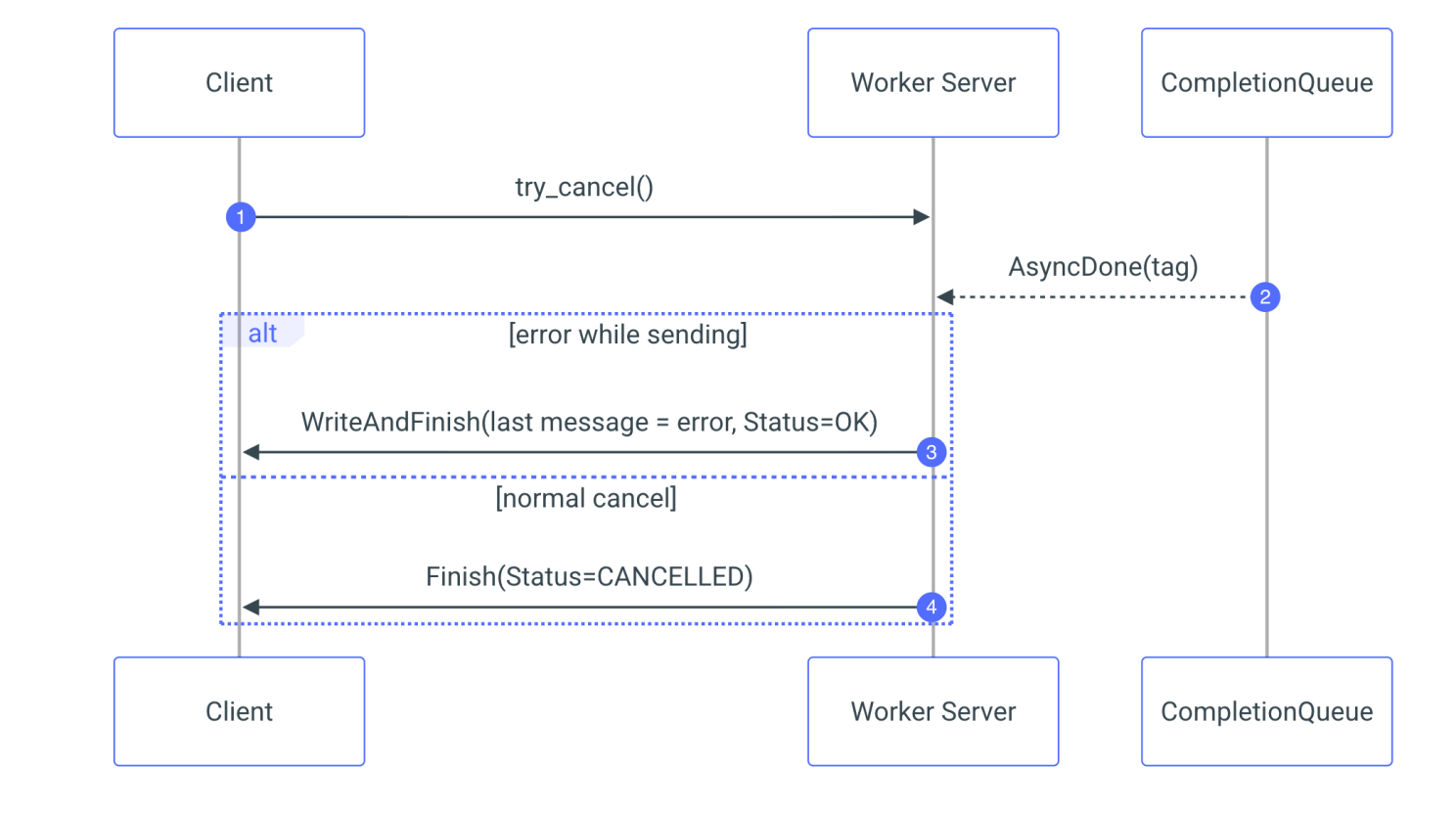
With our server now equipped with a fully asynchronous streaming process, complete with error handling and automatic memory management, we encounter a pivotal question: What happens if the client decides to interrupt the streaming? The client can decide at any moment that it has received all the data and wants to stop the stream. This can be done by calling try_cancel on the clientContext. Once the client interrupts the streaming, the server will receive an AsyncDone tag. At this point, the server should stop sending new chunks and close the stream. This is why we need both AsyncDone and FinishTag:
- The AsyncDone tag will indicate that the client has canceled the streaming, and the server should stop sending data.
- The FinishTag will be used to properly close the stream when the process is complete, whether due to normal completion or a client cancellation.
Listing 12. Send row method
Conclusion
In this article, we explored how to enhance the efficiency of streaming and request handling in a distributed system using gRPC and coroutines. By leveraging the power of asynchronous programming and streaming, we demonstrated how to optimize the handling of large datasets and complex queries. Through coroutines, we avoided the pitfalls of thread-blocking, ensuring that the system remains responsive even under heavy load. Additionally, our introduction of coroutine-based generators offers a notable advantage, simplifying the management of streaming data and facilitating request handling without the need for intricate thread management strategies.
On the server side, we implemented a robust memory management strategy using std::shared_ptr, which ensures that resources are properly allocated and deallocated without manual intervention. This allowed us to handle multiple streaming requests simultaneously without performance degradation, while also enabling the system to respond quickly to client interruptions and errors.
Through the integration of these techniques, we've engineered a scalable and efficient solution tailored for managing high-volume, real-time data streams. Whether tasked with handling millions of records or intricate analytic queries, this approach steadfastly guarantees the delivery of results without overwhelming the system or compromising performance.
As we continue to build upon these foundations, there are numerous opportunities for further optimization, including fine-tuning the coroutine mechanisms and exploring alternative data streaming paradigms. However, the key takeaway is that by using gRPC with coroutines and streaming, we can significantly improve both the efficiency and flexibility of distributed systems, making them more capable of handling modern, data-intensive workloads.
Mateusz Adamski, Senior C++ developer at Synerise